
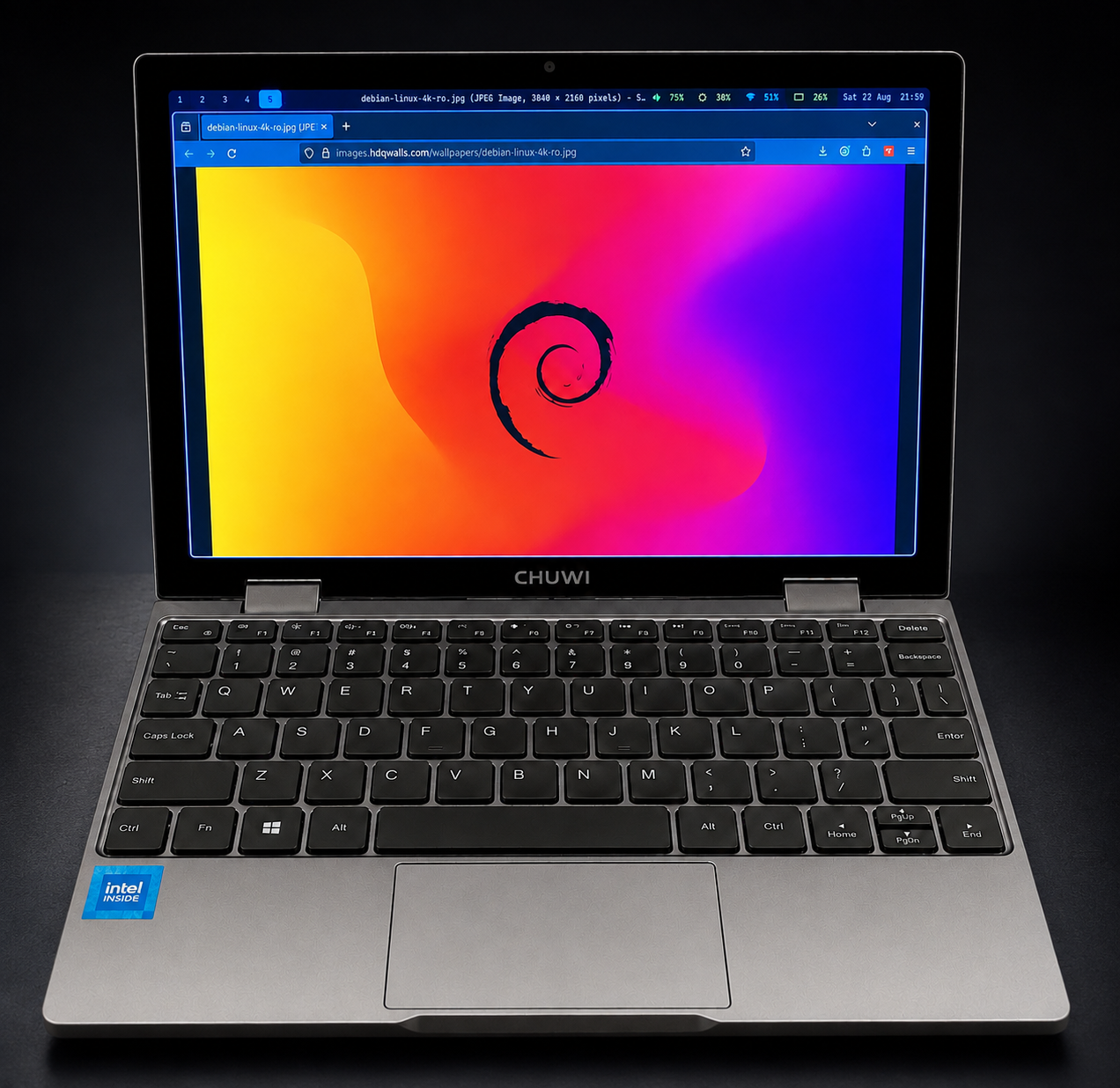
The code. Every config file described here lives in one repo, ready to clone: github.com/mattnovakemail/minibook-x-hyprland.
The machine
This writeup is specific to one laptop. Most of what follows is driven by its particular quirks — a rotated DSI panel, an extremely dense screen, a 6 W CPU, and firmware that blocks hibernation — so here it is in full:
| Model | CHUWI MiniBook X (BIOS DNN20 V2.50) |
| Form factor | 10.5" convertible, 360° hinge, touchscreen |
| CPU | Intel N150 (Alder Lake-N) — 4 cores / 4 threads, 700 MHz–3.6 GHz, 6 MiB L3, 6 W |
| RAM | 12 GB LPDDR5-6400, soldered — 4 × 3 GB rows across two channels |
| GPU | Intel Graphics (Alder Lake-N), 8086:46d4 |
| Panel | 1200×1920 DSI, mounted rotated → 1920×1200 landscape via transform 3 |
| Density | 141 × 226 mm → 10.5" diagonal → ~216 DPI |
| Touch | Goodix capacitive touchscreen (GDIX1002) over i2c |
| Wi-Fi | Intel CNVi 8086:54f0 |
| Audio | Alder Lake-N PCH HD Audio 8086:54c8 |
| Storage | 476 GB NVMe → LUKS → LVM (463 GB root, 11.7 GB swap) |
| Battery | 3800 mAh @ 7.6 V nominal, reporting 100% health |
| Firmware | Secure Boot enabled, kernel lockdown at integrity |
Two details from that table cause more trouble than the rest combined.
The panel is 2.25× denser than a normal display. A conventional desktop monitor is around 96 DPI; this one is 216. Anything rendered 1:1 comes out roughly half the size it should be. That single number explains the unreadable Firefox, the 24-point terminal font, and an entire section of scaling work below.
The CPU is a 6 W part. The N150 is genuinely capable for its class, but it has no thermal headroom to waste. That drives the choice of hardware video encoding, the power tuning, and the decision to shell into a bigger machine for compilation rather than build locally.
A note on the RAM figure, since it looks inconsistent: dmidecode reports
4 × 3 GB = 12 GB installed, while /proc/meminfo shows MemTotal: 11986544 kB ≈ 11.4 GiB. The difference is firmware reservation — normal, and
not a fault. It's a 12 GB machine.
The starting point
Debian 13 was installed — deliberately minimal. At the installer's software selection step only standard system utilities and SSH server were ticked; every desktop task was left unchecked. The disk was set up with the installer's guided encrypted LVM option, so root and swap both sit inside LUKS. Hyprland had been installed from backports, and that was about it.
The entire Hyprland config was thirteen lines. This is the starting state — the finished version is reproduced in full at the end of this post:
monitor = DSI-1, preferred, auto, 1, transform, 3

$mod = SUPER

exec-once = waybar
exec-once = mako

input {
	kb_layout = us

	touchpad {
		natural_scroll = true
		tap-to-click = true
	}
}

general {
	gaps_in = 3
	gaps_out = 5
	border_size = 2
}

decoration {
	rounding = 6
}

bind = $mod, Return, exec, foot
One keybinding. You could open a terminal. You could not close a window, move
one, switch workspaces, take a screenshot, lock the screen, or quit the
compositor. Waybar was listed in exec-once but had no config file at all.
The goal was a complete daily-driver desktop, tuned for battery life, on a machine intended mostly for SSH-ing into a beefier build box, taking screenshots, and light development.
What follows is everything that got built, and — more usefully — everything that broke along the way. The interesting through-line turned out not to be the configuration. It was this:
Almost every bug in this stack failed silently. Not one of them printed an error where anyone would look. A keybinding that did nothing. A stylesheet that vanished. Icons that rendered as blank space. A wallpaper daemon that logged one cryptic line and gave up. Precision that was invented out of thin air. The work wasn't writing config — it was noticing the absence of things.
Where it started, in numbers
Facts gathered rather than assumed, before changing anything:
- CPU governor:
powersaveon theintel_pstatedriver, EPP atbalance_performance - Idle draw: 3.68 W (0.5 A × 7.36 V), projecting ~7.6 h from full
- Sleep states offered:
freeze mem— and, unusually for a recent Intel laptop,mem_sleepoffering both[s2idle]anddeep. Many Alder Lake-N machines only expose s2idle; this one still has working S3, which turns out to matter a lot - Nerd Fonts installed: zero
- Display manager: none
- Wi-Fi: a hand-started
wpa_supplicantplusdhcpcd, no NetworkManager
Part 1 — The compositor, and a version that moved underneath us
Hyprland 0.55.2 is recent enough that a large amount of community documentation is simply wrong for it. Three concrete breakages surfaced within minutes of writing a normal-looking config.
Window rules changed shape entirely
The syntax everyone writes:
windowrule = float, class:^(pavucontrol)$
produces, in 0.55:
Config error: invalid field float: missing a value
The rule system was rebuilt around explicit key/value fields with a match:
prefix for the selector. The working form is:
windowrule = float = true, match:class = ^(pavucontrol)$
windowrule = suppress_event = maximize, match:class = .*
windowrule = size = 60% 55%, match:class = ^(foot-float)$
I found this by probing the live compositor with hyprctl keyword windowrule
until something returned ok, rather than guessing. The error messages were
genuinely helpful here — float = true, class = ... complained about class
specifically, which pointed straight at needing match:class.
togglesplit no longer exists
Invalid dispatcher, requested "togglesplit" does not exist
It moved into the layout message system:
bind = $mod, Y, layoutmsg, togglesplit
Similarly, dwindle:pseudotile is gone as a config option (the pseudo
dispatcher still exists), and misc:vfr moved to debug:vfr.
Gestures were rewritten
The familiar gestures { workspace_swipe = true } block returns
no such option. 0.51 replaced it with a top-level keyword:
gesture = 3, horizontal, workspace
gesture = 4, up, special, magic
The one that parses fine and does nothing
This is the first silent failure of the evening.
workspace = workspace = 1, monitor = DSI-1, persistent = true
hyprctl configerrors returns empty. The rule is accepted. The workspace is
never created. I tried every syntax variant I could construct — match:id,
bare 1,, with and without a monitor — and eventually spun up a nested
Hyprland instance with a throwaway config to test in isolation. None of them
work in 0.55.2.
Digging into the binary's strings revealed the internal function
ensurePersistentWorkspacesPresent and its failure mode
(couldn't resolve monitor for {}, skipping), which suggested the rule needs a
monitor — but supplying one changed nothing.
So I deleted the dead configuration rather than leave four lines that look
meaningful and aren't. Waybar's own persistent-workspaces setting displays
workspaces 1–5 permanently regardless, which is the actual user-visible
behaviour anyone wants from that feature.
Lesson: "it parses" and "it works" are unrelated claims. Verify the effect, not the syntax.
What got built
Roughly 80 keybindings, in themed groups:
| Keys | Function |
|---|---|
Super+Q |
close window |
Super+F / Super+Shift+F / Super+Ctrl+F |
fullscreen / maximize / fake-fullscreen |
Super+hjkl + arrows |
move focus |
Super+Shift+hjkl |
move the window |
Super+Alt+hjkl |
resize (key-repeating via binde) |
Super + left/right drag |
move / resize with the mouse (bindm) |
Super+1..5 |
five workspaces |
Super+Shift+1..5 / Super+Ctrl+1..5 |
send window there, following / staying |
Super+Tab, Super+scroll, 3-finger swipe |
cycle workspaces |
Super+S / Super+Alt+S |
scratchpad toggle / send to scratchpad |
Plus hardware keys (volume, brightness, mic mute) via wpctl and
brightnessctl, and a lid switch binding.
One small thing that mattered on a touchscreen device: the panel is rotated
transform 3, but the touchscreen input had no matching transform, so taps
landed in the wrong place. Wayland doesn't infer this:
input {
    touchdevice {
        transform = 3
    }
}
Part 2 — The bar, and a font that wasn't there
Waybar was in exec-once but had no config whatsoever, so it was running
with compiled-in defaults. Building a real one was straightforward: workspaces,
window title, wireplumber volume, backlight, network, battery, clock, tray,
all in a Tokyo Night palette.
Then every icon rendered as blank space.
The cause is a naming trap. Debian's fonts-font-awesome package installs a
font whose family name is literally FontAwesome — the legacy FA4 family —
not Font Awesome 6 Free, which is what every modern config snippet lists. The
CSS font stack silently matched nothing and fell through to a font with no
glyphs at those codepoints.
Worse, the glyphs I'd chosen weren't all in FA4. U+F5DE (a brightness icon
in newer sets) simply doesn't exist there. So I checked coverage directly
before picking anything:
fc-list ":charset=f185" family # → FontAwesome
and rebuilt the icon set from codepoints verified present. The final stack:
font-family: "JetBrains Mono", "FontAwesome", monospace;
The glyphs that vanished in transit
A subtler problem, and one that recurred all evening: three-byte
private-use-area characters get stripped when written through certain
tooling. Codepoints like U+E0B0 (the powerline separator) and U+E0A0 (the
git branch symbol) arrived at the file as empty strings, while four-byte
supplementary-plane glyphs like U+F0509 survived intact.
The result is config that looks correct and renders nothing:
[](fg:iris) # ← there is supposed to be a glyph inside those brackets
The fix is to inject them programmatically rather than typing them:
LCAP = chr(0xe0b6)   #  rounded left cap
s = s.replace('[](fg:iris)', '[%s](fg:iris)' % LCAP)
From that point on, every glyph in this project was written with chr() and
then audited by reading the file back and checking that the symbol fields
were non-empty. That audit caught two more empty symbols later in the starship
config that would otherwise have shipped as blank space.
Part 3 — Screenshots
A small script, ~/.config/scripts/screenshot, wrapping grim and slurp:
- always copies to the clipboard and saves to
~/Pictures/Screenshots regionusesslurp -d; pressing Escape exits silently rather than erroringwindowreads the focused window's geometry fromhyprctl activewindow -jviajq--editopens the capture inswappyfor cropping, arrows and redaction before saving
Bound to Super+Shift+S (region), Print (screen), Shift+Print (window),
and Super+Ctrl+Shift+S (region with annotation).
Note the window-geometry line, which is the sort of thing that's fragile if you
write it with grep and awk:
geom=$(hyprctl activewindow -j | jq -r '"\(.at[0]),\(.at[1]) \(.size[0])x\(.size[1])"')
Part 4 — Lock, idle, wallpaper, clipboard — and more version drift
Four packages: hyprlock, hypridle, hyprpaper, cliphist. Two of them
had moved their config format, and both failed quietly.
hyprpaper 0.8.4 removed preload entirely
The universally documented form:
preload = ~/Pictures/wallpaper.png
wallpaper = DSI-1, ~/Pictures/wallpaper.png
produces no error, no warning, and exactly one line of log:
Monitor DSI-1 has no target: no wp will be created
No wallpaper appears. Searching the binary for strings showed preload was
absent from it altogether, while monitor, path, fit_mode and order
were present — implying a block-structured format. The working config:
splash = false

wallpaper {
	monitor = DSI-1
	path = /home/YOUR-USER/Pictures/wallpaper.png
	fit_mode = cover
}
Also: ~ is not expanded, so paths must be absolute.
hyprlock moved grace out of general
Config error: config option <general:grace> does not exist
In 0.9.5 it's a top-level key. I found this by testing candidate placements
against a throwaway config using hyprlock --display no-such-display, which
parses the file and then fails to connect — a config check that never locks
your screen. That trick was worth its weight later.
There was no wallpaper at all
No image existed on the machine, and neither ImageMagick nor Python's PIL was installed. Rather than pull in a dependency, I generated a 1920×1200 Tokyo Night gradient by writing the PNG by hand — zlib-compressed scanlines, CRC'd chunks, ordered dithering to prevent banding on an 8-bit gradient:
def chunk(tag, data):
    return (struct.pack('>I', len(data)) + tag + data
            + struct.pack('>I', zlib.crc32(tag + data) & 0xffffffff))

png = (b'\x89PNG\r\n\x1a\n'
       + chunk(b'IHDR', struct.pack('>IIBBBBB', W, H, 8, 2, 0, 0, 0))
       + chunk(b'IDAT', zlib.compress(bytes(rows), 9))
       + chunk(b'IEND', b''))
118 KB, no dependencies, and it became the basis for the lock screen and greeter backgrounds too.
Verifying the lock screen safely
Before letting anything auto-lock the machine, two checks:
/etc/pam.d/hyprlockexists and includes theloginstack — if PAM were misconfigured, the first idle lock would strand the user permanently.- A deliberate, timed test-lock to confirm it renders and releases.
Both passed. That second check is also where this post's biggest mistake originates, but that comes later.
Part 5 — The idle ladder incident
This is the most instructive failure of the evening, because nothing was broken. Everything worked exactly as configured. The configuration was just wrong for a human being.
The initial hypridle ladder:
| idle | action |
|---|---|
| 4 min | brightnessctl -s set 10% |
| 8 min | lock |
| 10 min | screen off |
| 30 min | systemctl suspend |
I started it live and moved on without saying the timers were now armed.
Four minutes later, while reading my own summary on screen, the backlight
dropped to 10%. On this panel that reads as a dead screen, not a dim one.
The reasonable response to a laptop that appears to have died is to switch to a
different TTY — which is exactly what happened: Ctrl+Alt+F2, log in, start a
second Hyprland session.
The consequences compounded:
- Two live sessions. The abandoned tty1 session kept running, along with
its waybar, mako, hyprpaper — and its
hypridle. - An abandoned session is permanently idle. Its 30-minute
systemctl suspendtimer was still counting, andsystemctl suspendsuspends the whole machine, not a session. It would have fired while the user was working in the new session. - Two hypridle daemons were now driving global hardware — one backlight, one DPMS state, one suspend command — from two different idle clocks.
I also discovered I'd left two orphaned nested Hyprland instances running
from the persistent-workspace experiment; timeout 12 had sent SIGTERM and
they'd survived it, running for seventeen minutes.
The fixes
The immediate hazards were killed with about four minutes to spare before the next session's dim/lock cycle. Then the policy changed:
# 10 min -- dim, but stay clearly readable. Any input restores.
listener {
	timeout = 600
	on-timeout = brightnessctl -s set 30%
	on-resume = brightnessctl -r
}

# 20 min -- screen off
listener {
	timeout = 1200
	on-timeout = hyprctl dispatch dpms off
	on-resume = hyprctl dispatch dpms on
}

# No auto-lock and no auto-suspend. Lock manually with Super+Escape.
30% instead of 10% — dim, never dead-looking. Ten minutes instead of four. No auto-suspend at all.
And a structural fix so this class of problem can't recur:
exec-once = pgrep -x hypridle >/dev/null || hypridle # singleton: global hardware
hypridle touches global hardware, so it must be a singleton across sessions.
Waybar and hyprpaper are legitimately per-session; hypridle is not.
Lessons:
- Never arm timers on someone's live machine without telling them the clock is running.
- A dim that looks like failure is a failure, regardless of intent.
- Daemons that control global hardware need singleton guards, because sessions can and do stack up.
timeoutsending SIGTERM does not guarantee a process dies. Verify.
Part 6 — The binding that did nothing
Super+Shift+S produced no selector, no error, no notification. Nothing.
The binding was registered correctly — hyprctl binds showed
mods=65 key=S -> exec screenshot region. The script existed and was
executable. Running it by hand worked perfectly.
The environment Hyprland's exec inherits is not your login shell's:
PATH=/usr/local/bin:/usr/bin:/bin:/usr/local/games:/usr/games
No ~/.local/bin. The shell couldn't resolve screenshot, and the exec failed
into the void — Hyprland doesn't surface a failed exec anywhere visible.
Every earlier test of mine had passed because I'd been exporting
PATH="$HOME/.local/bin:$PATH" in my own shell before running things. I had
never once tested the environment the binding runs in.
The fix, belt and braces:
env = PATH,/home/YOUR-USER/.config/scripts:/home/YOUR-USER/.local/bin:/usr/local/bin:/usr/bin:/bin:...
$scripts = /home/YOUR-USER/.config/scripts
bind = $mod SHIFT, S, exec, $scripts/screenshot region
Both the env line and absolute paths, so the bindings work even if the env
line is ever lost. Verified by making Hyprland itself report its environment:
hyprctl dispatch exec "sh -c 'echo PATH=$PATH > /tmp/probe.txt'"
Lesson: test in the environment the code will actually run in, not the one that's convenient.
Part 7 — HiDPI: 216 DPI and the scale that fixes everything
Firefox launched with unreadably small UI. The instinct is to hunt for a Firefox font setting. That would have been wrong — the same problem afflicted every GTK app, every dialog, every file picker, because it isn't a font problem at all.
At 216 DPI with no scaling, everything renders at roughly half its intended physical size. That's also why the terminal font had been set to 24pt: at 216 DPI, 24pt lands at a normal-looking ~10.7pt physically.
The fix is compositor scaling:
monitor = DSI-1, preferred, auto, 1.5, transform, 3
Scale 1.5 was chosen deliberately over 1.25, 1.75 and 2.0 because 1920/1.5 = 1280 and 1200/1.5 = 800 are both exact integers. Fractional scales that don't divide evenly (1.75 gives 1097.14 × 685.71) force resampling and soften text. Effective density becomes ~144 DPI.
Then everything already tuned for the unscaled screen had to be rebalanced so it stayed the same physical size:
| before | after | physical result | |
|---|---|---|---|
| foot font | 24pt @ 1.0 | 16pt @ 1.5 | unchanged |
| waybar height | 42px @ 1.0 | 28px @ 1.5 | unchanged |
| waybar font | 20px @ 1.0 | 13px @ 1.5 | unchanged |
Both running apps reported xwayland=false, so they scale natively rather than
going through XWayland's blurry path.
The 25-second bar
After the reboot that followed, waybar took 25 seconds to appear. Its log:
[info] Unable to receive desktop appearance: Timeout was reached
Waybar asks the XDG desktop portal for the light/dark preference at startup and waits out a full D-Bus timeout when nobody answers.
Nobody answered because xdg-desktop-portal-gtk had failed to start, and
it had failed because the systemd user manager outlives individual login
sessions and was still advertising WAYLAND_DISPLAY=wayland-1 — the display of
the session that got abandoned during the idle incident. The GTK portal started,
couldn't reach a display that no longer existed, and exited 1.
exec-once = dbus-update-activation-environment --systemd WAYLAND_DISPLAY XDG_CURRENT_DESKTOP XDG_SESSION_TYPE HYPRLAND_INSTANCE_SIGNATURE
exec-once = systemctl --user restart xdg-desktop-portal-gtk.service
Startup went from 25 seconds to 1 second. The same fix repairs file-picker dialogs and screen sharing, which route through the identical portal and were broken in exactly the same way.
Part 8 — Battery
Baseline: 3.68 W idle, projecting ~7.6 hours from full. Decent for an N150 — but several cheap wins were sitting unclaimed.
Energy performance preference. intel_pstate was at
balance_performance. A systemd oneshot pins it:
ExecStart=/bin/sh -c 'for f in /sys/devices/system/cpu/cpu*/cpufreq/energy_performance_preference; do echo power > "$f"; done'
Bluetooth was running with zero paired devices — a daemon and a radio powered for nothing. Disabled.
thermald wasn't installed. On a 6 W part, Intel's thermal daemon is worth having.
powertop was installed but nothing ran --auto-tune at boot. Now a
oneshot unit does, and I verified afterwards that the touchpad, keyboards and
touchscreen were all still enumerated — powertop's aggressive runtime PM has a
reputation for breaking input devices.
Wi-Fi power saving was off; a unit enables it via iw.
Result: 3.68 W → 3.57 W, plus a much lower-power sleep state (below).
Part 9 — The network, and the worst mistake of the evening
The machine's Wi-Fi was managed by a hand-started wpa_supplicant plus a
hand-started dhcpcd — no NetworkManager, no nmtui, no roaming, and the
waybar network module's click action pointed at nmtui, which wasn't
installed. Another silent no-op.
I decided to migrate to NetworkManager, and got two things badly wrong.
Mistake one: reading a permission error as an empty file
cat /etc/network/interfaces # printed nothing
I concluded the file was empty and announced that the Wi-Fi config wasn't
persistent and wouldn't survive a reboot. In fact the file is 363 bytes, mode
0600 — the cat had failed with permission denied, and I'd read the empty
output as an empty file. The user's reboot disproved me directly.
Worse, that file contained the PSK. Reading it properly would have let me configure NetworkManager non-interactively from the start, without ever needing to ask for a password.
Mistake two: a teardown with no completion guarantee
The migration ran as a plain foreground command:
pkill -f 'wpa_supplicant ...'
pkill dhcpcd
systemctl enable --now NetworkManager    # ← never reached
The command was interrupted between the pkill and the enable. The old stack
was dead; the new one had never started. The user came back from a shower to a
machine with no networking, and after a suspend/resume cycle it still had none —
because nothing was left running to restore it.
The fix: make it atomic and self-healing
The rewritten migration is a script that cannot leave a half-state:
- Read SSID and PSK from
/etc/network/interfaces - Write the NetworkManager profile first, before touching anything
- Comment the interface out of ifupdown's control
- Stop the old stack
- Start NetworkManager
- Poll for up to 60 s for genuine connectivity — an IP and a successful ping
- On failure, roll back automatically: restore the backup, restart
ifup@, and report
It also logs to /var/log/net-switch.log so a failure is diagnosable rather
than mysterious. It ran clean: SWITCH-OK, same IP, and it survived a
suspend/resume intact.
Lessons:
- A silent command failure and an empty result look identical. Check exit status, or run privileged reads privileged.
- Any operation that dismantles working infrastructure before building its replacement must be atomic and must roll itself back. "I'll just run these four commands" is not a plan.
Part 10 — Sleep: measuring instead of guessing
The direct question was: what happens when I close the lid — will suspend break this machine?
Rather than opine, I wrote a test script that suspends via rtcwake with a
hardware timer wake, so the machine returns on its own even if the resume
path is completely broken, and logs everything before sleeping so a
non-returning machine still leaves evidence.
First result: it works, but the test was worthless
rtcwake rc=0  asleep for 5s (asked for 20s)
battery before: 22%   battery after: 23%
Suspend and resume worked — clean resume, network intact, no hang. But the battery went up: the machine was on AC, so the drain figure measured nothing. And it slept for 3.3 seconds instead of 20, because charging generates a constant stream of EC events, any of which can wake an s2idle system.
Second result, on battery, and a lesson in fake precision
Ten minutes in each state:
| mode | 10 minutes asleep | woke early? |
|---|---|---|
| s2idle | one full 1% step consumed | no — slept 602 s |
| deep (S3) | below the detection floor | no — slept 604 s |
The script had confidently printed "5.98 %/hour". That number is fabricated precision, and I'd written the code that produced it.
This battery reports charge_now in 38000 µAh quanta — exactly 1%. Every
reading in both tests is a multiple of it: 950000, 912000, 874000, 836000. A
ten-minute test that consumes one step tells you the true rate is somewhere
around 3–12 %/hour. It does not tell you 5.98.
The script now reports step counts and an explicit quantisation range:
drain: 38000 uAh over 602s = 1 reporting step(s)
       midpoint 227 mAh/h (6.0 %/h, ~17h from full)
       range    0.0-12.0 %/h  <- quantisation, not noise
       only 1 step(s) resolved; test 3-4x longer for a firm number
The comparison still stands on its own: same duration, same conditions, one
state consumed a measurable step and the other didn't. deep wins
unambiguously, even without a precise ratio.
Making it permanent, without touching the bootloader
I had earlier described switching to S3 as a kernel-commandline change
requiring a GRUB edit and a reboot. That was wrong: /sys/power/mem_sleep is
writable at runtime. So the whole thing is a sysfs write:
ExecStart=/bin/sh -c 'grep -qw deep /sys/power/mem_sleep && echo deep > /sys/power/mem_sleep'
Same effect as mem_sleep_default=deep, no bootloader risk, and
systemctl disable mem-sleep-deep fully reverts it.
Hibernate: blocked, and I got this wrong first
I initially reported hibernate as "95% configured, needs testing not building",
pointing at the correctly-sized 11.7 GB encrypted swap and the RESUME= entry
already present in the initramfs.
Then I actually looked at /sys/power/state:
freeze mem
No disk. Hibernation is unavailable. The reason:
lockdown:   none [integrity] confidentiality
secureboot: SecureBoot enabled
Secure Boot puts the kernel in integrity lockdown, which disables
hibernation outright — regardless of CONFIG_HIBERNATION=y, swap sizing, or
resume configuration. The kernel refuses because it can't verify the resume
image hasn't been tampered with.
Everything I'd said about the storage side was correct. I simply hadn't checked the one thing that actually gated it. With S3 now working, hibernate's advantage shrank enough that keeping Secure Boot is the better trade.
Part 11 — A graphical greeter
There was no display manager at all. Login was a text console, after which Hyprland had to be started by hand.
The chosen stack: greetd → Hyprland (minimal) → gtkgreet.
Running gtkgreet inside a tiny Hyprland instance rather than under cage is
deliberate: this panel needs transform 3 and scale 1.5, and cage can't rotate
an output. A greeter compositor config solves it in two lines:
monitor = DSI-1, preferred, auto, 1.5, transform, 3
exec-once = gtkgreet -l -b /usr/share/backgrounds/login.png -s /etc/greetd/gtkgreet.css -c start-hyprland; hyprctl dispatch exit
greetd is deliberately on VT 7, leaving tty1–6 as plain console logins — the escape hatch if the greeter ever fails.
Hardening before shipping something unverified
I could not fully verify the greeter before the user rebooted: their live Hyprland session held DRM master, so the greeter's compositor could never acquire the display while it was running.
Shipping something unverified means hardening the failure path. greetd ships
Restart=always with RestartSec=1, so a broken greeter would respawn every
second, seizing VT 7 each time and making it genuinely difficult to reach a
console. A drop-in caps it:
[Unit]
StartLimitIntervalSec=60
StartLimitBurst=3
Three failures in sixty seconds and it gives up, leaving you on a TTY.
Two bugs found by looking
The greeter user got no groups. This:
usermod -aG video,input,render,seat _greetd
failed entirely because the seat group doesn't exist on this system —
usermod aborts the whole call rather than adding the three valid groups. It
had to be split into separate invocations. A greeter with no video group
cannot open the DRM device.
The wallpaper was unreachable. A home directory is drwx------, so _greetd
could never have read a background from the user's home. The image had to go to
/usr/share/backgrounds/.
GTK CSS silently discarding the entire stylesheet
Styling gtkgreet, I squeezed the form inward with:
box#body {
    margin-left: 34%;
    margin-right: 34%;
}
The greeter rendered in default GTK — stock blue button, wrong fonts, nothing themed. Not partially styled. Entirely unstyled.
Theme parsing error: gtkgreet.css:23:19: Junk at end of value for margin-left
style loading failed: gtkgreet.css:23:19
GTK CSS does not support percentage margins, and a single invalid declaration causes GTK to discard the whole stylesheet. One bad line, and every rule in the file evaporates.
This is the same failure shape as the empty icons and the unresolvable PATH:
the system does exactly nothing, and the nothing looks like a design choice.
Every render after that checked for style loading failed explicitly.
The error that flashed at boot
The greeter came up on the first real reboot — with something flashing briefly in the top-right. That's Hyprland's error overlay, and the cause:
WARNING: Hyprland is being launched without start-hyprland. This is highly advised against.
greetd was invoking Hyprland directly rather than the start-hyprland
watchdog wrapper. The fix passes the config through the wrapper:
command = "start-hyprland -- --config /etc/greetd/hyprland.conf"
I had that exact warning in my very first nested test log and dismissed the
neighbouring line — Creating the Error Overlay! — as routine object
construction. It wasn't routine. The overlay was being built because of that
warning. A user glancing at their screen for one second found what I'd had in a
log file and misread.
Part 12 — Typography and a prompt
The font
The machine had zero Nerd Fonts — only legacy FontAwesome and plain
JetBrains Mono. Four styles of MesloLGS NF went into
~/.local/share/fonts (user-level, no root).
Rather than replace the typeface, foot uses a fallback chain:
font=MesloLGS NF:size=16, JetBrains Mono:size=16
foot falls through to later fonts for missing glyphs, so text renders in the primary face and only icons come from the fallback.
The prompt
Starship, two lines, self-contained "pills", Tokyo Night, rendering in 27 ms:
…/demo master 1 v20.19.2 45s
→ npm test
The first version was a continuous powerline chain. It looked good in a git repo, and left two orphaned arrows dangling in a plain directory, because chained background colours assume every segment renders. Self-contained pills — each with its own rounded caps — degrade correctly in every case. Tested across plain directory, clean repo, dirty repo, and repo-with-node.
Two other decisions:
right_formatdoesn't work in bash at all (fish/zsh/nushell only). I'd written battery and clock into it before checking. They were dropped rather than faked with$fill— waybar already shows both, and at 24pt there are only ~50 columns in a half-tiled window.- Segments appear only when relevant: git pill only in a repo, language pill only in a project, duration only past 2 s, exit code only on failure.
Finding a glyph, properly
Asked for a ghost icon, I guessed six codepoints and rendered them at 30pt.
They turned out to be a gift box, the Dropbox logo, an image placeholder, a
keyboard, a fishhook and a lightning bolt. F02A1, which I'd tried, is one
past the real ghost.
So I stopped guessing and fetched the authoritative mapping:
curl -fsSL https://raw.githubusercontent.com/ryanoasis/nerd-fonts/master/glyphnames.json
Eight glyphs match "ghost". Rendering them revealed two more traps:
nf-dev-ghost is the Ghost blogging platform wordmark, and nf-fa-ghost
(U+EEFE) isn't present in MesloLGS NF at all — it renders as a tofu box.
That one would have shipped as an empty rectangle on the strength of its name.
The winner: nf-md-ghost, U+F02A0.
Part 13 — The launcher, and matching the lock screen to it
fuzzel
Super+D had no configuration. It now has a translucent #1a1b26 panel, a 2px
iris border with 14px radius, MesloLGS NF, Adwaita app icons, and a magnifier
prompt glyph.
Two settings matter beyond looks:
dpi-aware=no      # scale with the compositor's 1.5x, don't compute our own DPI
match-mode=fzf    # subsequence matching: "tgd" finds Telegram Desktop
The first render used selection=2f3549, which was almost indistinguishable
from the 1a1b26 background — the highlighted row was effectively invisible.
3b4261 matches waybar's hover state and reads clearly. That's the kind of
thing only a screenshot tells you.
hyprlock, and a measurement that overturned an assumption
Restyling the lock screen to match used hyprlock's shape element to draw the
same panel.
The first attempt came out visibly undersized. Measuring the screenshot
explained why: a panel declared 440 wide rendered 440 physical pixels on a
1920-pixel screen. hyprlock draws in physical pixels and ignores the
compositor's 1.5 scale — unlike fuzzel, waybar, and every normal Wayland
client. Every dimension in that config is therefore ~1.5× its equivalent
elsewhere, and the file says so in a comment so the next person doesn't have to
rediscover it.
Final panel: 780×430, chosen to match fuzzel's measured ~787 px width so the two read as one design.
Part 14 — Lockdead
The worst outage of the evening, and entirely self-inflicted.
To preview the restyled lock screen I ran, twice in quick succession:
setsid timeout -s TERM 15 hyprlock --grace 0 &
hyprlock's own log tells the whole story:
Locking session
onLockFinished called. Seems we got yeeten. Is another lockscreen running?
corrupted double-linked list (not small)
A second hyprlock started while the first still held the session lock. Wayland refused it, and it then hit heap corruption and aborted while the session was locked. When a session locker dies without releasing the lock, the compositor deliberately stays locked — a security property, not a bug. The screen was stuck with no locker. The user had to power-cycle.
Three fixes
1. Stop testing that way. SIGTERM-ing a session locker was never safe.
Previews now happen inside a nested Hyprland instance, which has its own
session lock and cannot touch the real one. For a true-scale preview, the real
monitor can be dropped to scale 1.0 briefly so a fullscreen nested compositor
is genuinely 1920×1200 — reversible with a single hyprctl reload.
2. Make lockdead recoverable.
misc {
    allow_session_lock_restore = true
}
A freshly launched hyprlock can now adopt an orphaned lock instead of
requiring a reboot. Recovery is documented in the keybinding cheatsheet:
Ctrl+Alt+F2, log in, hyprctl -i 0 dispatch exec hyprlock.
3. A near-miss worth recording. While cleaning up leftover nested
instances I wrote pkill -x Hyprland, which would have killed the user's real
session along with the strays. It was blocked before it ran. The correct
approach — identifying the nested instance by PID from ps -eo pid,tty,args
and killing exactly that — takes ten more seconds and cannot destroy anything.
Earlier in the same session I'd also written
pkill -f 'start-hyprland -- --config', which matched its own command line
and killed the shell executing it, silently skipping every subsequent step.
pkill with broad patterns is a loaded gun pointed at whatever happens to
match, including yourself.
Part 15 — Applications
Thunderbird and Telegram Desktop, with one non-obvious correction.
Telegram is a Qt5 application, and Qt5 defaults to the xcb backend — it
would have run through XWayland and looked soft at 1.5 scale, the same class of
problem as the tiny Firefox. qtwayland5 was already installed; it just needed
telling:
env = QT_QPA_PLATFORM,wayland;xcb
The ;xcb suffix is a deliberate fallback so any Qt app still starts if the
Wayland plugin fails, rather than refusing to launch. Verified:
xwayland=false on both apps.
They also both opened onto workspace 1, quartering the terminal workspace into 628×374 boxes. On a 1280×800 logical screen that's unusable, so applications got homes:
windowrule = workspace = 2, match:class = ^(firefox|firefox-esr)$
windowrule = workspace = 3, match:class = ^(thunderbird)$
windowrule = workspace = 4, match:class = ^(org\.telegram\.desktop)$
Part 16 — Screen recording
wf-recorder, with two decisions that matter more than usual on this hardware.
Hardware encoding. vainfo reports H.264 and HEVC EncSliceLP — low-power
encode — on renderD128. Software-encoding 1920×1200 on a 6 W N150 would have
destroyed both framerate and battery:
wf-recorder -c h264_vaapi -d /dev/dri/renderD128 --codec-param=qp=24 -m mp4
Signals, again. wf-recorder must be stopped with SIGINT, not SIGTERM or
SIGKILL: it writes the MP4 moov atom on interrupt, and a harder kill leaves an
unplayable file. Given how the evening had gone, this was verified rather than
assumed — a test capture was parsed for its top-level boxes:
top-level boxes: ['ftyp', 'free', 'mdat', 'moov']
moov present (finalised): True
Recording is a toggle (Super+Alt+R screen, +Shift region, Super+Alt+A
with system audio), a red REC pill appears in waybar while active and is
hidden otherwise, and the file path lands in the clipboard on stop.
Audio defaults to off, and --audio captures the default sink's .monitor
— system audio, what you hear — not the microphone. Mic capture is a separate
explicit --mic flag, so nothing records you by accident.
Part 17 — The console, where none of the fonts exist
The prompt looked wrong outside Hyprland. Icons missing, colours flat. The instinct is to install the font on the console too. That instinct is wrong, and usefully so.
The Linux virtual console does not use fontconfig. It loads a PSF font
directly into the video hardware, and the format is hard-capped at 512
glyphs. Nerd Font icons live in the Private Use Area — U+E000–U+F8FF and
the supplementary block at U+F0000+. They cannot be represented in a console
font at all. There is no font you can install that fixes this, because the VT
never consults the font system that would find it.
The console also has no truecolor. Hex values like #bb9af7 have nowhere to go;
you get the 16 ANSI colours.
So the console gets a different prompt, chosen automatically:
if command -v starship >/dev/null 2>&1; then
    if [ "$TERM" = "linux" ]; then
        export STARSHIP_CONFIG="$HOME/.config/starship-tty.toml"
    fi
    eval "$(starship init bash)"
fi
starship-tty.toml carries the same information with pure ASCII symbols and
named ANSI colours — git:main, ~1 ?1 for modified and untracked,
node:v20.19.2, > for the character:
user@host .../system git:main ~1 ?1 node:v20.19.2 took 4s !NOTFOUND
>
Rather than squint at it, the check was programmatic — strip the escape sequences and assert that nothing above ASCII survives:
txt = re.sub(r'\x1b\[[0-9;]*m', '', out)
bad = [(c, hex(ord(c))) for c in txt if ord(c) > 127]
#  → NONE
The bigger console problem nobody mentioned
At 216 DPI, the default Fixed 8x16 console font is 5.3 points physically.
Not small — unreadable.
That matters more than it sounds, because on this machine the TTY is the documented escape hatch: it is where you go when the greeter fails to start, and where you go to recover a dead lock screen. Twice in one evening it was the recovery path. An escape hatch you cannot read is not an escape hatch.
 8x16 glyph  →  5.3pt physical   unusable
16x32 glyph  → 10.7pt physical   comfortable
Debian ships Terminus at that size, though the filenames are a trap:
Lat15-Terminus32x16.psf.gz is 16 wide by 32 tall — the name lists height
first. Verified by reading the PSF2 header rather than trusting the ordering:
h = struct.unpack('<I', d[24:28])[0]   # 32
w = struct.unpack('<I', d[28:32])[0]   # 16
FONTFACE="TerminusBold"
FONTSIZE="16x32"
120 × 37 cells on the panel, at a size you can actually read.
And one last silent no-op, right on cue
Applying it:
sudo setupcon --force
Exit status 0. Nothing changed. The cached loader still read:
setfont '/usr/share/consolefonts/Lat15-Fixed16.psf.gz'
with timestamps untouched from that morning's install. --force does not
regenerate the cache; setupcon --save --force does. The only way to catch it
was to read the generated script and compare file timestamps — the command
itself reported success either way.
What was deliberately left broken
The LUKS passphrase prompt at boot is still 8×16, because Debian's
console-setup package ships no initramfs hook — the hooks directory has
keymap and a pile of cryptroot scripts, but nothing for the font. Getting a
console font into the initramfs means hand-writing a hook, and on a machine that
boots from an encrypted root, a broken initramfs hook is an unbootable machine.
A larger password prompt is not worth that risk. Documented as a known limitation instead of quietly attempted.
Part 18 — Files: one need that was already met, one that wasn't
Two requirements that sound like the same thing and aren't: a working file picker for browser uploads, and something to browse files in.
The picker needed nothing at all
The instinct is to install a file manager so the browser has something to open.
That is not how it works. Firefox and Chromium get their upload dialog from
GTK, or from the XDG desktop portal — org.freedesktop.portal.FileChooser,
implemented here by xdg-desktop-portal-gtk. No file manager is involved.
Rather than assume it worked, the exact call the browser makes was invoked directly over D-Bus:
gdbus call --session \
  --dest org.freedesktop.portal.Desktop \
  --object-path /org/freedesktop/portal/desktop \
  --method org.freedesktop.portal.FileChooser.OpenFile \
  "" "Upload a file" "{}"
A real dialog appeared — Wayland-native, dark-themed, with Recent / Home / Other Locations. Nothing to install.
Worth noting why it worked, because it very nearly didn't: this is the same
portal stack that was silently broken earlier by a stale WAYLAND_DISPLAY in
the systemd user environment. The dbus-update-activation-environment fix that
took waybar's startup from 25 seconds to 1 also repaired file pickers and
screen sharing, which route through the identical backend. One environment
variable, three unrelated-looking symptoms.
The browser: pcmanfm, and two silent config traps
For actually browsing files with image previews, the candidates by installed footprint:
| size | direct deps | |
|---|---|---|
nnn |
171 KB | 5 |
thunar |
1238 KB | 20 |
pcmanfm |
1588 KB | 11 |
lf |
5610 KB | 0 (static Go) |
Thunar is nominally smaller than pcmanfm but drags in twenty XFCE dependencies. pcmanfm won on total weight.
On previews specifically: no lightweight GTK file manager has a hover-preview pane. What pcmanfm does instead is better in practice — persistent thumbnails in thumbnail view, so every image in a directory shows its content at once rather than one at a time under the cursor.
Getting those thumbnails working took two corrections, both silent, both mine.
Keys in the wrong section are discarded without a word. I wrote
thumbnail_local and thumbnail_max under [ui]. libfm expects them in
[config]. The size key is thumbnail_size, not thumbnail_icon_size. First
launch showed generic mimetype icons, no error, no warning, empty thumbnail
cache. The only way I found the correct names was to read the file pcmanfm
itself had rewritten, which spelled out the schema it actually uses.
The config file is autogenerated and overwritten on exit:
# Configuration file for the libfm version 1.4.0.
# Autogenerated file, don't edit, your changes will be overwritten.
My first edit was reverted the instant pcmanfm launched. It has to be written while pcmanfm is not running — which is a rule the file politely states and which is very easy to skim past.
One more default worth changing: thumbnail_max=2048 is a size cap in KB.
Images larger than 2 MB silently get no thumbnail. Current screenshots are
~200 KB so it wasn't the blocker, but a photo or a full-resolution capture
would have quietly lost its preview later. Set to 0 for no limit.
[config]
thumbnail_local=1
thumbnail_max=0

[ui]
thumbnail_size=160
show_thumbnail=1
Bound to Super+E, and registered as the inode/directory handler so "open
containing folder" works from other applications.
Part 19 — Camera and microphone, and 60 dB of stacked gain
"Does the webcam work?" is a question with two very different answers: does the device enumerate, and does it produce usable output. Only the second one matters before a video call, and only the second one requires actually capturing something.
The camera enumerated, then proved itself
/dev/video0, /dev/video1, /dev/media0
uvcvideo loaded
Hy-Usb2.0-1*MIC: Hy-UXGA(8101)-   1600x1200 / 960x720 / 640x480
Enumeration is not evidence. The real test is a frame:
v4l2-ctl -d /dev/video0 --stream-mmap --stream-count=1 --stream-to=frame.raw
168 KB for a 1600×1200 capture is far too small for raw YUYV (which would be 3.8 MB), so it should be MJPEG — confirmed by the magic bytes:
d[:2] == b'\xff\xd8' # → JPEG
A real, compressed, correctly-sized image. That's the camera working.
I deliberately did not open the file. Format, size and a successful capture prove the device works; the contents are a photograph of somebody's room. Verification does not require looking at it, and it was deleted along with the audio test.
The microphone "worked" and was completely unusable
The first recording captured audio on the first try. It was also garbage:
6.0s   peak 0.00000 dBFS   rms -1.3 dBFS
non-zero samples: 285689/285696  (100.0%)
A microphone in a quiet room does not produce an RMS of −1.3 dBFS. That is a saturated square wave — the input pegged against the rail for six solid seconds. "The mic works" and "the mic is usable on a call" were, again, unrelated claims.
The codec's mixer explained it immediately:
Capture            63/63  [100%]  [+30.00 dB]
Internal Mic Boost  3/3   [100%]  [+30.00 dB]
Sixty decibels of gain stacked on an internal microphone. Two independent controls, each at maximum, each contributing +30 dB. Nothing warns you; the device simply reports beautifully loud audio that happens to be clipped beyond recognition.
Dropping Internal Mic Boost to 0 dB and the PipeWire source to 40%:
peak -0.3 dBFS rms -17.6 dBFS clipped samples: 0
Persisted with alsactl store so it survives reboots.
The measurement that nearly went wrong
My second attempt still showed clipping, and the obvious move was to keep cutting gain until it stopped. That would have been wrong.
wpctl status showed a live stream:
Streams:
    66. Firefox
         68. output_FL  > ALC269VC Analog:playback_FL  [active]
Firefox was playing audio through the speakers, and the microphone was faithfully recording it. I was about to tune a microphone against the machine's own output. Muting the sink for the duration of the measurement — and unmuting afterwards — isolated the actual room:
wpctl set-mute @DEFAULT_AUDIO_SINK@ 1
#   ... record ...
wpctl set-mute @DEFAULT_AUDIO_SINK@ 0
The lesson generalises well beyond audio: before tuning against a measurement, check what else is feeding into it.
The device name that lies
The USB module identifies itself as Hy-Usb2.0-1*MIC, which reads
unambiguously as "this is where the microphone is". It is not:
Port 005: Dev 002, If 0, Class=Video, Driver=uvcvideo
Port 005: Dev 002, If 1, Class=Video, Driver=uvcvideo
Two interfaces, both Video. No USB audio class interface at all, and
/proc/asound/cards lists exactly one card — the Intel HDA codec. The
microphone is the built-in analog input; the camera module has no microphone
despite its name. Worth knowing before hunting for a device in a
conferencing app's dropdown that does not exist.
For video calls specifically
Camera access in Firefox and Chromium goes straight through V4L2 — no portal
involved, and the user needs to be in the video group (or hold the logind
ACL). Screen sharing does go through the portal, which means
xdg-desktop-portal-hyprland has to be alive — the same portal stack that
serves file pickers, and the same one that was silently dead earlier over a
stale WAYLAND_DISPLAY.
Final advice worth writing down: after setting levels by measurement, confirm them with the conferencing app's own audio test and its live level meter. A number that looks right for room noise still has to be right for a speaking voice, and that is not something a script can measure for you.
Part 20 — The small pieces that make it a daily driver
Not everything worth doing needs a section of its own. These are the pieces that turn a configured compositor into a machine you actually work on.
Remote development, on a laptop that suspends
This machine is not for compiling. It is for shelling into something that is. That changes which tools matter.
mosh is the important one, and the reason is specific to a laptop: an SSH
session dies when the machine suspends or changes network. Close the lid,
walk to a café, open it — the SSH connection is gone and whatever it was
running went with it. mosh survives both suspend and roaming, reconnects
silently, and keeps local echo responsive over bad links. Paired with tmux on
the remote end, closing the lid mid-build costs nothing.
The SSH config is tuned for the same reality:
Host *
    ServerAliveInterval 20
    ServerAliveCountMax 3
    TCPKeepAlive no
    ControlMaster auto
    ControlPath ~/.ssh/cm-%r@%h:%p
    ControlPersist 10m
    AddKeysToAgent yes
    IdentityFile ~/.ssh/id_ed25519
ServerAliveInterval with a low count means dead connections fail fast
instead of hanging for minutes after a resume. ControlMaster with
ControlPersist 10m multiplexes subsequent connections over the first one, so
the second and third ssh to the same host are instant — noticeable on a
machine where you open a lot of short-lived sessions.
Default applications, so things open where you expect
A desktop without mime associations is a desktop where double-clicking does nothing. The set here is deliberately minimal — one lightweight tool per type:
[Default Applications]
inode/directory=pcmanfm.desktop
image/png=imv.desktop
image/jpeg=imv.desktop
application/pdf=org.pwmt.zathura.desktop
text/html=firefox-esr.desktop
x-scheme-handler/https=firefox-esr.desktop
imv is a Wayland-native image viewer, zathura a keyboard-driven PDF reader.
Both are small, both start instantly, and neither pulls in a desktop
environment. This matters more than it sounds on a screenshot-heavy workflow:
the screenshot tool saves a file, and you want looking at it to be free.
Clipboard history
cliphist with two watchers — one for text, one for images:
exec-once = pgrep -f "type text --watch cliphist" >/dev/null || wl-paste --type text --watch cliphist store
exec-once = pgrep -f "type image --watch cliphist" >/dev/null || wl-paste --type image --watch cliphist store
Super+Shift+V pipes the history through fuzzel and copies the selection back.
Image entries are stored too, which pairs neatly with a screenshot tool that
always copies to the clipboard — the last several screenshots stay retrievable
rather than being overwritten by the next Ctrl+C.
The pgrep guards are the same singleton pattern used for hypridle: these
are per-user daemons, and a second login session should not start a second
copy.
A cheatsheet, because eighty bindings is too many to remember
Super+/ opens a formatted reference in a floating terminal — apps, window
management, workspaces, screenshots, recording, clipboard, and the recovery
steps for a hung lock screen. It is a shell script with printf, which means
it costs nothing and cannot itself break.
Everything in version control
All of it lives in a git repo in ~/.config, including copies of the files
that live outside it — the four custom systemd units, the greeter config in
/etc/greetd, ~/.bashrc and ~/.profile, and /etc/default/console-setup —
each with a README noting the live path, since editing the copy does nothing.
Fifteen commits, each one explaining why rather than what. That matters more than usual here, because a surprising amount of this configuration looks arbitrary until you know which silent failure it exists to prevent.
MiniBook X quirks worth knowing
Things specific to this hardware that cost time, and that anyone else running Linux on an N150 MiniBook X will meet.
The panel is mounted rotated
The DSI panel is physically 1200×1920 portrait, mounted sideways. Everything must be rotated in software:
monitor = DSI-1, preferred, auto, 1.5, transform, 3
The kernel console needs telling separately — this machine already had
fbcon=rotate:1 on the kernel command line, which is why the boot text and TTYs
are the right way up. Without it, your escape hatch is sideways.
The touchscreen does not inherit the rotation. Wayland won't infer it, so taps land in the wrong place until you match the transform explicitly:
input {
    touchdevice {
        transform = 3
    }
}
Any greeter or lock screen also needs its own rotation, which is why the greeter
here runs gtkgreet inside a minimal Hyprland rather than under cage — cage
can't rotate an output.
Goodix touchscreen throws an i2c error on every resume
Goodix-TS i2c-GDIX1002:00: Error reading 1 bytes from 0x8047: -121
-121 is EREMOTEIO, and it fires on every wake from suspend. It looks
alarming in dmesg --level=err and it is entirely cosmetic: the device never
re-probes, stays registered on the same input node, and touch works normally
afterwards. Verified by resuming and using it.
DSI link not ready on resume, and atomic-update warnings in normal use
i915 0000:00:02.0: [drm] *ERROR* DSI link not ready
i915 0000:00:02.0: [drm] *ERROR* Atomic update failure on pipe A ...
Both are logged at error level and neither indicates a real fault. Check the uptime stamps: the atomic-update messages appear mid-session, nowhere near a suspend, so they're routine scanline-timing warnings on a DSI panel. The link message appears at resume and the display recovers immediately.
The internal microphone ships with +60 dB of gain
Out of the box, the ALC269VC codec has both capture controls at maximum:
Capture            63/63  [+30.00 dB]
Internal Mic Boost  3/3   [+30.00 dB]
The result is audio clipped into a square wave — it records, and it is unusable on a call. Fix, then persist it:
amixer -c 0 sset "Internal Mic Boost" 0
wpctl set-volume @DEFAULT_AUDIO_SOURCE@ 0.40
sudo alsactl store
The camera module is named "MIC" and has no microphone
The webcam enumerates as Hy-Usb2.0-1*MIC, which reads like a combined
camera-and-microphone device. lsusb -t shows two interfaces, both Class=Video,
and /proc/asound/cards lists only the Intel HDA codec. There is no
camera-side microphone. The camera itself is fine: MJPEG at 1600×1200, 960×720
and 640×480.
The firmware has broken ACPI tables
Every boot logs exactly six ACPI errors:
ACPI BIOS Error (bug): Failure creating named object [\_SB.PC00.RP09.PXSX._DSD], AE_ALREADY_EXISTS
ACPI BIOS Error (bug): Could not resolve symbol [\_SB.PC00.TXHC.RHUB.SS01], AE_NOT_FOUND
Bluetooth: hci0: No support for _PRR ACPI method
Six on this boot, six on the previous, six on the one before. They are CHUWI
firmware bugs, they are harmless, and they will alarm you if you go looking at
journalctl -p 3 for the first time after changing something. Count them
across boots before blaming your own work.
The firmware refuses Secure Boot dbx updates
fwupd offers a Microsoft UEFI revocation-database update and then reports:
Update Error: System firmware cannot accept DBX updates
So there is effectively nothing installable via fwupd on this machine. Worth setting up anyway, but don't expect it to do anything.
Secure Boot blocks hibernation
lockdown:   none [integrity] confidentiality
secureboot: SecureBoot enabled
Secure Boot puts the kernel in integrity lockdown, and lockdown disables
hibernation outright. /sys/power/state shows freeze mem with no disk,
no matter how correctly your swap is sized or how carefully RESUME= is set in
the initramfs. Your options are to disable Secure Boot in firmware or to do
without hibernate.
But S3 deep sleep does work — and it's worth switching to
This is the good news, and it's unusual for a recent Intel laptop:
/sys/power/mem_sleep: [s2idle] deep
deep is offered and functional. Measured over ten minutes each on battery,
s2idle consumed a full 1% battery step while deep stayed below the measurement
floor entirely. Since /sys/power/mem_sleep is writable at runtime, switching
needs no bootloader edit at all:
ExecStart=/bin/sh -c 'grep -qw deep /sys/power/mem_sleep && echo deep > /sys/power/mem_sleep'
With hibernate unavailable, this is the single most valuable power change on the machine.
Battery reports charge in 1% quanta
charge_now on this battery only moves in 38000 µAh steps — exactly 1% of
its 3800 mAh design capacity. Any drain measurement shorter than an hour
resolves one or two steps and cannot support more than one significant figure.
Do not let a script print you "5.98 %/hour" from a ten-minute sample; it is
arithmetic, not measurement.
The N150 has hardware video encoding — use it
VAProfileH264Main:  VAEntrypointEncSliceLP
VAProfileHEVCMain:  VAEntrypointEncSliceLP
EncSliceLP is Intel's low-power encode path, available on /dev/dri/renderD128
once intel-media-va-driver is installed. On a 6 W part, software-encoding a
1920×1200 screen recording is not viable; VAAPI is close to free.
The machine itself: worth it
This post is a long list of things that broke, so it would be easy to come away with the wrong impression. Let me correct that, because the MiniBook X is a genuinely excellent little computer and most of the problems above were software drift, not hardware faults.
It is completely silent, and it stays cold. There are zero fans in this
chassis — /sys/class/hwmon/*/fan1_input returns nothing to enumerate. Under a
load average of ~1.0 with Firefox, Thunderbird and Telegram all running, the
package temperature sits at 34 °C against an ambient of 27.8 °C. Six
degrees over room temperature. You can work with it on your lap indefinitely,
and there is no fan noise because there is no fan.
It is quick in the ways you actually notice. The N150 is a 6 W part, and on
paper that sounds like a compromise. In practice: graphical.target is reached
4.3 seconds into userspace, the shell prompt renders in 27 ms, the
status bar starts in 1 second, and applications launch without the pause
you brace for on low-power hardware. LPDDR5-6400 across two channels is doing
real work here — this is not the sluggish Atom experience the "N" prefix might
suggest.
The battery genuinely lasts. Measured on battery with the full application stack running: 3.83 W, projecting 7.6 hours from full on a 3800 mAh cell. Idle at the desktop it drops to 3.57 W. And with S3 deep sleep enabled, a closed lid consumed less than the battery's own 1% measurement resolution across ten minutes — you can shut it and walk away without watching the charge evaporate.
The screen is the standout feature. 1920×1200 on a 10.5-inch panel works out to 216 PPI. For context:
| display | PPI |
|---|---|
| CHUWI MiniBook X | 216 |
| MacBook Air 13" | 225 |
| MacBook Pro 14" | 254 |
| typical 24" 1080p desktop monitor | 92 |
It is within four percent of a MacBook Air's density, on a machine that costs a fraction as much. Text at 1.5× scale is genuinely crisp — the entire scaling section of this post exists precisely because the panel is too good to run unscaled. The 3:2 aspect ratio is also the right choice for a small screen: more vertical space for code and documents than a 16:9 panel of the same diagonal.
The build quality is not what the price suggests. Aluminium chassis, a 360° hinge with no flex, a keyboard that is genuinely usable at this size, and a touchscreen that works properly once you tell Wayland the panel is rotated. It feels like a considerably more expensive machine than it is.
So: should you buy one?
Yes — with clear eyes about what you are buying.
The issues catalogued in this post are worth reading before you commit, and they are almost all one-time setup costs rather than daily friction:
- Secure Boot blocks hibernation. S3 deep sleep works, which covers most of the same ground, but you should know before you plan around hibernate.
- The internal microphone ships with +60 dB of stacked gain and must be turned down before it is usable on a call. One command, once.
- The camera module is misleadingly named and has no microphone in it.
- The firmware logs six harmless ACPI errors on every boot and refuses dbx updates.
- The panel is mounted rotated, so anything that draws to the screen — greeter, lock screen, console — needs to be told about it.
None of that is a defect in daily use. Every one of them is a thing you configure once and never think about again. What you get in return is a fanless, silent, genuinely portable machine with a near-Retina screen and seven-plus hours of real battery life, running a full Wayland desktop comfortably on 6 watts.
For SSH-ing into a build box, taking screenshots, writing, and light development — the exact workload this was set up for — it is hard to think of anything better at the price. It is a fantastic little machine and it is well worth what it costs.
What the finished system looks like
~/.config/                          15 commits, 39 tracked files
├── hypr/
│   ├── hyprland.conf               277 lines — compositor, 80+ binds
│   ├── hyprlock.conf               109 lines — lock screen
│   ├── hypridle.conf                28 lines — idle policy
│   └── hyprpaper.conf                     — wallpaper
├── waybar/{config.jsonc,style.css}  bar + Tokyo Night CSS
├── fuzzel/fuzzel.ini                launcher
├── starship.toml                   214 lines — prompt (Nerd Font, truecolor)
├── starship-tty.toml               ASCII/16-colour prompt for the VT
├── foot/foot.ini                    terminal
├── mako/config                      notifications
├── swappy/config                    screenshot annotation
├── pcmanfm/, libfm/                 file manager + thumbnail settings
├── gtk-3.0/, gtk-4.0/               GTK settings (no gsettings on this box)
├── scripts/
│   ├── screenshot                   grim/slurp/swappy → clipboard + file
│   ├── record                       wf-recorder toggle, VAAPI
│   ├── hypr-keys                    keybinding cheatsheet (Super+/)
│   ├── sleep-test.sh                rtcwake harness with honest drain math
│   └── net-switch.sh                atomic ifupdown→NM migration w/ rollback
├── systemd-system/                  copies of 4 custom units, for VCS
├── greetd-system/                   copies of the greeter config, for VCS
├── home-dotfiles/                   copies of ~/.bashrc, ~/.profile
└── etc-console-setup/               copy of /etc/default/console-setup
Custom systemd units: epp-power, powertop, wifi-powersave,
mem-sleep-deep.
Measured outcomes: 3.68 W → 3.57 W idle; s2idle → deep (S3) sleep; waybar startup 25 s → 1 s; prompt renders in 27 ms; every application confirmed Wayland-native.
The pattern
Nineteen distinct problems were solved over the course of this build. Almost none of them announced themselves.
- A binding that did nothing, because
PATHlacked one directory - Icons that rendered as blank space, because a font family had a different name than every tutorial claims
- Glyphs stripped to empty strings in transit, twice
- A stylesheet entirely discarded over one unsupported unit
- A wallpaper daemon that logged one line and gave up
- A workspace rule that parses cleanly and does nothing
- A menu item pointing at a program that isn't installed
- A 25-second startup delay caused by a display name from a session that no longer existed
- Fabricated precision from a quantised sensor
- A permission error read as an empty file
- A
usermodthat added no groups because one name was invalid - A
pkillthat killed the shell running it - A
setupcon --forcethat exited 0 and regenerated nothing - Config keys placed in the wrong INI section, discarded without comment
- A config file silently overwritten by the program that reads it
- A microphone at +60 dB reporting healthy, fully-clipped audio
- A USB device whose name advertises a microphone it does not have
The tools were not lying. They were saying nothing at all, and nothing is indistinguishable from success until you go looking.
Three habits did most of the work:
Verify the effect, not the syntax. hyprctl configerrors being empty means
the parser was satisfied. It says nothing about whether the workspace exists,
the wallpaper drew, or the binding fired. Every claim in this post that
survived was one where the outcome was observed — a screenshot taken, a
process listed, a file's byte structure parsed.
Test in the real environment. The screenshot binding worked every time I tested it, because I was testing in my shell and not in Hyprland's. The greeter's compositor could never be verified while a live session held DRM master. Where the real environment couldn't be reached, the honest move was to say so and harden the failure path instead of claiming success.
When you can see it, look at it. fuzzel, gtkgreet and hyprlock are all Wayland clients that can be screenshotted. Every visual decision here — the invisible selection colour, the crushed background gradient, the orphaned powerline arrows, the undersized lock panel, the fake ghost glyphs — was caught by rendering the thing and looking at it, not by reasoning about the config.
The single most expensive mistake, the lockdead reboot, came from breaking that last rule in the most direct way possible: I tested a lock screen by locking a screen someone was using.
What is still outstanding
In the spirit of the rest of this post, the things that are not done:
There is no off-machine backup. The configuration is in git — fifteen
commits — but git remote returns nothing. It lives on exactly one encrypted
NVMe. Every silent failure catalogued here was recoverable; a dead disk would
not be. This is the highest-value remaining task and it takes about a minute.
No automatic security updates. unattended-upgrades is not installed, on a
laptop that roams onto networks it does not control.
No on-screen keyboard, on a 360° convertible. Fold it into tablet mode and
there is no way to type — including at the greeter and the lock screen, which
would strand you. wvkbd is the Wayland answer, and it needs wiring into
hyprlock and gtkgreet specifically, not just the desktop session.
The sleep drain figure is one significant figure at best. Ten-minute samples resolve a single 1% battery step. An hour-long test would give a real number; the comparison between s2idle and deep stands regardless, because both ran under identical conditions.
Secure Boot versus hibernation is an open decision, deliberately left to the owner. With S3 working, the case for disabling Secure Boot is much weaker than it was.
hyprlock looks fragile in this build. It aborted with
corrupted double-linked list when a second instance was refused the session
lock — and it aborted with the same message during a harmless config parse
check with no display attached. It locks and unlocks reliably in normal use,
and allow_session_lock_restore now makes a failure recoverable rather than
terminal, but it is worth knowing.
The LUKS passphrase prompt is still 8×16. Deliberate: Debian ships no console-setup initramfs hook, and hand-writing one on an encrypted-root machine risks an unbootable system.
Two things were checked and needed nothing: fstrim.timer is enabled and
active (correct, given discard on the LUKS volume), and the firmware has no
installable updates.
Before you copy anything: what to substitute
Paths and device names in this post are from one machine. Four things need changing, and one of them is not optional.
/home/YOUR-USER appears in hyprland.conf and hyprpaper.conf. These
must be absolute paths — Hyprland does not expand $HOME in env = or in
$variable definitions, and hyprpaper 0.8.4 does not expand ~ in a
wallpaper { path = } block either. That last one fails silently: you get one
log line about the monitor having no target, and no wallpaper. Substitute your
actual username rather than trying to make ~ work.
(hyprlock.conf is the exception — it does expand ~ in its background
path.)
DSI-1 is this panel's output name. It is the same on any MiniBook X, but
on other hardware run hyprctl monitors and use whatever Monitor <name>
reports.
wlp0s20f3 is this machine's wireless interface, referenced in the
wifi-powersave unit. Find yours with ip -br link.
card0 / /dev/dri/renderD128 are the ALSA card index and the DRM render
node used in the microphone and screen-recording commands. Both are index 0 on
a single-GPU, single-sound-card laptop, which this is; confirm with
aplay -l and ls /dev/dri/.
Everything else — usernames in prompt examples, hostnames — is cosmetic.
Appendix — reproducing this from scratch
An ordered runbook. Everything here was done on this machine; the parts that predate the desktop build (the Debian install itself, backports, the console rotation) are included because without them the rest does not work.
1. The Debian install
Debian 13 "trixie", installed from the netinst image. At the software selection step, everything graphical is deselected:
[ ] Debian desktop environment
[ ] ... GNOME / KDE / Xfce / etc
[*] SSH server
[*] standard system utilities
That is the whole point — no display manager, no desktop, no half of GNOME arriving as a dependency. You get a text console and a network stack, and every graphical component that ends up on the machine is one you chose.
For partitioning: Guided — use entire disk and set up encrypted LVM. That produces the layout this machine runs:
nvme0n1
├─nvme0n1p1   976M  vfat         /boot/efi
├─nvme0n1p2   977M  ext4         /boot          (unencrypted; required for LUKS root)
└─nvme0n1p3   475G  crypto_LUKS
  └─nvme0n1p3_crypt  LVM2 volume group "host-vg"
    ├─host--vg-root    463.2G  ext4   /
    └─host--vg-swap_1   11.7G  swap   [SWAP]
/boot has to sit outside the encrypted volume so the bootloader can read a
kernel and initramfs; everything else is inside. The resulting crypttab entry
matters later:
nvme0n1p3_crypt UUID=... none luks,discard,x-initrd.attach
discard enables TRIM through the LUKS layer (pair it with fstrim.timer,
which Debian enables by default), and x-initrd.attach unlocks the volume
early — which is what would make hibernate-to-encrypted-swap possible, if
Secure Boot were not blocking hibernation.
2. Console rotation, before anything else
This panel is mounted rotated. Until the kernel console is rotated, the text console — your only interface at this point, and your escape hatch forever after — is sideways.
sudo nano /etc/default/grub
GRUB_CMDLINE_LINUX_DEFAULT="quiet fbcon=rotate:1"
sudo update-grub
fbcon=rotate:1 rotates the framebuffer console 90° clockwise. It is
independent of anything Wayland does later — Hyprland's transform = 3 handles
the graphical session, and this handles TTYs, the GRUB menu's aftermath, and
the boot messages.
Reboot and confirm the console is readable before continuing.
3. A readable console font
At 216 DPI the default Fixed 8x16 is 5.3 points. Fix it now, while the
console is still the primary interface:
sudo nano /etc/default/console-setup
FONTFACE="TerminusBold"
FONTSIZE="16x32"
sudo setupcon --save --force # --force alone silently does nothing
4. Enable backports
Hyprland is not in Debian stable:
echo 'deb http://deb.debian.org/debian trixie-backports main' \
    | sudo tee /etc/apt/sources.list.d/trixie-backports.list
sudo apt update
5. Install the compositor and the desktop
hyprland exists only in backports, so it would resolve there on its own. Pass
-t trixie-backports anyway: the flag is what allows its dependencies to be
satisfied from backports too. mesa, PipeWire, WirePlumber and libxkbcommon all
exist in stable at older versions, and without the flag you get a new compositor
on an old graphics stack:
sudo apt install -t trixie-backports hyprland xdg-desktop-portal-hyprland
Then everything else — see the install appendix below for the full command and which packages resolve to backports on their own.
6. Group membership
sudo usermod -aG video $USER # camera and DRM access
Log out and back in for it to take effect. Note that usermod -aG a,b,c aborts
entirely if any one group does not exist — issue them separately if unsure.
7. Fonts
mkdir -p ~/.local/share/fonts && cd ~/.local/share/fonts
base=https://github.com/romkatv/powerlevel10k-media/raw/master
for style in Regular Bold Italic "Bold%20Italic"; do
    curl -fsSL "$base/MesloLGS%20NF%20${style}.ttf" \
         -o "MesloLGS NF ${style//%20/ }.ttf"
done
fc-cache -f ~/.local/share/fonts
8. The four systemd units
None of these ship with anything; all are hand-written to
/etc/systemd/system/, then sudo systemctl enable --now <name>.
# epp-power.service — intel_pstate energy preference
[Unit]
Description=Set intel_pstate energy_performance_preference to power
After=multi-user.target
[Service]
Type=oneshot
ExecStart=/bin/sh -c 'for f in /sys/devices/system/cpu/cpu*/cpufreq/energy_performance_preference; do echo power > "$f"; done'
RemainAfterExit=yes
[Install]
WantedBy=multi-user.target
# mem-sleep-deep.service — S3 instead of s2idle
[Service]
Type=oneshot
ExecStart=/bin/sh -c 'grep -qw deep /sys/power/mem_sleep && echo deep > /sys/power/mem_sleep'
RemainAfterExit=yes
# wifi-powersave.service
[Service]
Type=oneshot
ExecStart=/usr/sbin/iw dev wlp0s20f3 set power_save on
RemainAfterExit=yes
# powertop.service — runtime PM for PCI/SATA/audio
[Service]
Type=oneshot
ExecStart=/usr/sbin/powertop --auto-tune
RemainAfterExit=yes
Also sudo systemctl disable --now bluetooth if you have no paired devices,
and sudo systemctl enable --now thermald.
9. The greeter
Four files, all under /etc/greetd/, plus a systemd drop-in:
config.toml—vt = 7, andcommand = "start-hyprland -- --config /etc/greetd/hyprland.conf". LaunchingHyprlanddirectly makes it raise a warning into its on-screen error overlay.hyprland.conf— a minimal compositor carrying the samemonitor = DSI-1, preferred, auto, 1.5, transform, 3,input:touchdevice:transform = 3, andenv = GTK_THEME,Adwaita:dark, whose onlyexec-onceruns gtkgreet and then exits.gtkgreet.css— theming. Remember GTK CSS rejects percentage units and discards the entire stylesheet on one bad declaration.environments— one line:start-hyprland.
sudo usermod -aG video _greetd
sudo usermod -aG input _greetd
sudo usermod -aG render _greetd
The background must live somewhere _greetd can read — /usr/share/backgrounds/,
not your home directory, which is mode 0700.
And the safety net, at
/etc/systemd/system/greetd.service.d/10-restart-limit.conf:
[Unit]
StartLimitIntervalSec=60
StartLimitBurst=3
[Service]
RestartSec=2
greetd defaults to Restart=always with a one-second delay; without this, a
broken greeter respawns forever and seizes VT 7 each time, making it very hard
to reach a console to fix it.
10. Networking
If the installer left you on ifupdown (a hand-rolled wpa_supplicant plus
dhcpcd), migrating to NetworkManager gives you roaming, nmtui, and a
working click target in the status bar. The PSK is already on disk in
/etc/network/interfaces — mode 0600, so read it with sudo; a plain
cat fails with permission denied and prints nothing, which is easy to
misread as an empty file.
Write the NetworkManager profile before tearing down the old stack, and have the migration roll itself back if connectivity does not return.
11. The microphone
Non-negotiable before any video call on this hardware:
amixer -c 0 sset "Internal Mic Boost" 0
wpctl set-volume @DEFAULT_AUDIO_SOURCE@ 0.40
sudo alsactl store
12. Verify, rather than assume
hyprctl configerrors                       # empty
cat /sys/power/mem_sleep                   # s2idle [deep]
cat /sys/devices/system/cpu/cpu0/cpufreq/energy_performance_preference   # power
systemctl --failed                         # 0 units
systemctl is-active greetd thermald powertop mem-sleep-deep
wpctl status                               # a sink and a source
v4l2-ctl -d /dev/video0 --stream-mmap --stream-count=1 --stream-to=/tmp/f.raw
Then reboot once and confirm the greeter comes up on its own. Everything in this post that broke, broke because something was assumed rather than checked.
Appendix — everything installed, and the backports situation
Why backports is involved at all
Debian 13 "trixie" is a stable release, and stable does not carry Hyprland or its satellite tools. They live in trixie-backports — packages built from testing/unstable and recompiled against stable's libraries.
On this machine backports was already enabled before the desktop build started, so nothing in this post required editing apt sources. For anyone reproducing it from a clean Debian 13, this is the setup:
echo 'deb http://deb.debian.org/debian trixie-backports main' \
    | sudo tee /etc/apt/sources.list.d/trixie-backports.list
sudo apt update
The full source list on this machine, for reference:
# /etc/apt/sources.list
deb http://deb.debian.org/debian/ trixie main non-free-firmware
deb http://security.debian.org/debian-security trixie-security main non-free-firmware
deb http://deb.debian.org/debian/ trixie-updates main non-free-firmware

# /etc/apt/sources.list.d/trixie-backports.list
deb http://deb.debian.org/debian trixie-backports main
The mechanic worth understanding: priority 100
Backports is marked NotAutomatic, which apt translates into priority 100
— below the default 500 of the normal archives:
100 http://deb.debian.org/debian trixie-backports/main amd64 Packages
    release o=Debian Backports,a=stable-backports,n=trixie-backports,...
500 http://deb.debian.org/debian trixie-updates/main amd64 Packages
That has two consequences, and they are easy to get backwards:
Enabling backports will not silently upgrade anything. Nothing already
installed from stable gets pulled forward. fwupd on this machine exists in
both archives and stayed on the stable version (2.0.20-1~deb13u1) precisely
because 500 beats 100. This is the whole point of the design — you opt in per
package, not wholesale.
But you do not always need -t. If a package exists only in backports,
its version is the only candidate and apt installs it without argument. That is
why apt install hyprlock worked here with no flags: there is no hyprlock in
trixie main at all.
You need -t trixie-backports when the package exists in both and you want the
newer one — and critically, that flag also lets apt satisfy dependencies
from backports. That is how the graphics stack on this machine ended up
modernised: installing Hyprland from backports dragged mesa 26.1.2, PipeWire
1.4.9, WirePlumber 0.5.12 and libxkbcommon 1.13.1 forward with it, all of which
do exist in stable at older versions.
Forty-eight packages on this system now come from backports. The load-bearing ones:
| package | version | why |
|---|---|---|
hyprland |
0.55.2+ds-1~bpo13+1 | not in stable |
hyprlock |
0.9.5-1~bpo13+1 | not in stable |
hypridle |
0.1.7-2~bpo13+1 | not in stable |
hyprpaper |
0.8.4-1~bpo13+1 | not in stable |
xdg-desktop-portal-hyprland |
1.3.12-1~bpo13+1 | not in stable |
telegram-desktop |
5.7.2+ds-2~bpo13+1 | not in stable |
mesa-* |
26.1.2-1~bpo13+1 | pulled as a Hyprland dependency |
pipewire, wireplumber |
1.4.9 / 0.5.12 | pulled as a dependency |
libxkbcommon* |
1.13.1-1~bpo13+1 | pulled as a dependency |
This is also, indirectly, the reason so much of this post is about version drift: running a compositor from backports on a stable base means the software is considerably newer than most of the documentation written about it.
The full install, in one command
Everything added during this build. Debian shipped hyprland, waybar,
mako, foot, fuzzel, grim, slurp, wl-clipboard, brightnessctl,
powertop, jq, git, mosh, tmux and rsync already:
sudo apt update && sudo apt install -y \
    hyprlock hypridle hyprpaper cliphist \
    greetd gtkgreet \
    network-manager thermald fwupd iw \
    imv zathura swappy pcmanfm \
    wf-recorder vainfo intel-media-va-driver \
    thunderbird telegram-desktop \
    starship \
    util-linux-extra v4l-utils alsa-utils libglib2.0-bin
Of those, four resolve to backports automatically because they have no stable
version — hyprlock, hypridle, hyprpaper and telegram-desktop. The rest
come from trixie main. No -t flag is needed for any of them.
The last line is diagnostics that earned their place during the build:
| package | provides | used for |
|---|---|---|
util-linux-extra |
rtcwake |
timed-wake suspend testing |
v4l-utils |
v4l2-ctl |
proving the camera captures frames |
alsa-utils |
amixer, alsactl |
finding and fixing +60 dB of mic gain |
libglib2.0-bin |
gdbus |
invoking the FileChooser portal directly |
If you would rather not install the diagnostics permanently, everything except
alsa-utils can be removed afterwards — but alsactl is what persists the
mixer settings across reboots, so that one should stay.
Fonts, which are not packaged
MesloLGS NF is not in Debian. Installed per-user, no root required:
mkdir -p ~/.local/share/fonts && cd ~/.local/share/fonts
base=https://github.com/romkatv/powerlevel10k-media/raw/master
for style in Regular Bold Italic "Bold%20Italic"; do
    curl -fsSL "$base/MesloLGS%20NF%20${style}.ttf" \
         -o "MesloLGS NF ${style//%20/ }.ttf"
done
fc-cache -f ~/.local/share/fonts
Debian's fonts-font-awesome is worth having as well, but note the trap from
Part 2: it installs a family named FontAwesome, not Font Awesome 6 Free.
Appendix — the finished hyprland.conf
The thirteen lines at the top of this post grew into this. Reproduced in full, because most of the comments exist to record why a line is the way it is — which silent failure it prevents, or which 0.55 syntax change it survives. This file and every other one below are in the repo: github.com/mattnovakemail/minibook-x-hyprland.
###############################################################################
# MONITOR  --  1200x1920 DSI panel, rotated 270 deg -> 1920x1200 landscape
#
# The panel is 10.5" at 1920x1200 = ~216 DPI, i.e. 2.25x a normal 96 DPI
# display, which is why everything renders tiny at scale 1. Scale 1.5 gives
# 1280x800 logical (an exact integer division, so no blurry resampling) and
# ~144 DPI effective. Every Wayland client scales with this -- GTK apps,
# Firefox, dialogs, cursors -- not just text.
###############################################################################
monitor = DSI-1, preferred, auto, 1.5, transform, 3

# Hyprland does not inherit the login shell's PATH, so ~/.local/bin is absent
# and any bind calling a script there silently does nothing.
# Telegram is Qt5, which defaults to xcb -> XWayland -> soft at 1.5x scale.
# ";xcb" is a fallback so a Qt app still starts if the wayland plugin fails.
env = QT_QPA_PLATFORM,wayland;xcb
env = QT_WAYLAND_DISABLE_WINDOWDECORATION,1
env = QT_AUTO_SCREEN_SCALE_FACTOR,1

env = XCURSOR_SIZE,24
env = HYPRCURSOR_SIZE,24
env = PATH,/home/YOUR-USER/.config/scripts:/home/YOUR-USER/.local/bin:/usr/local/bin:/usr/bin:/bin:/usr/local/games:/usr/games

$scripts  = /home/YOUR-USER/.config/scripts
$mod      = SUPER
$terminal = foot
$menu     = fuzzel
$browser  = firefox

###############################################################################
# AUTOSTART
###############################################################################
# The systemd/dbus user manager outlives a session and keeps the OLD
# WAYLAND_DISPLAY, which makes xdg-desktop-portal-gtk fail to start and costs
# waybar a 25s timeout on every launch. Hand it the live session's values first.
exec-once = dbus-update-activation-environment --systemd WAYLAND_DISPLAY XDG_CURRENT_DESKTOP XDG_SESSION_TYPE HYPRLAND_INSTANCE_SIGNATURE
exec-once = systemctl --user restart xdg-desktop-portal-gtk.service

exec-once = hyprpaper
exec-once = waybar
exec-once = mako
exec-once = pgrep -x hypridle >/dev/null || hypridle    # singleton: global hardware
exec-once = pgrep -f "type text --watch cliphist" >/dev/null || wl-paste --type text --watch cliphist store
exec-once = pgrep -f "type image --watch cliphist" >/dev/null || wl-paste --type image --watch cliphist store

###############################################################################
# INPUT
###############################################################################
input {
	kb_layout = us
	follow_mouse = 1
	sensitivity = 0

	touchpad {
		natural_scroll = true
		tap-to-click = true
		drag_lock = true
		disable_while_typing = true
		scroll_factor = 0.6
	}

	# Touchscreen must match the panel rotation, or taps land in the wrong spot.
	touchdevice {
		transform = 3
	}
}

# Three fingers sideways = change desktop; four fingers = scratchpad.
gesture = 3, horizontal, workspace
gesture = 4, up, special, magic

###############################################################################
# LOOK
###############################################################################
general {
	gaps_in = 3
	gaps_out = 5
	border_size = 2
	col.active_border = rgba(7aa2f7ff) rgba(bb9af7ff) 45deg
	col.inactive_border = rgba(2a2f41aa)
	resize_on_border = true
	layout = dwindle
}

decoration {
	rounding = 6

	blur {
		enabled = true
		size = 4
		passes = 2
	}

	shadow {
		enabled = true
		range = 12
		render_power = 3
		color = rgba(00000055)
	}
}

animations {
	enabled = true
	bezier = snap, 0.05, 0.9, 0.1, 1.05
	animation = windows, 1, 4, snap, popin 80%
	animation = border, 1, 8, default
	animation = fade, 1, 5, default
	animation = workspaces, 1, 4, snap, slide
}

dwindle {
	preserve_split = true
	smart_resizing = true
}

misc {
	# If the lock screen ever dies while holding the session lock, Hyprland
	# normally leaves the session locked with no locker ("lockdead") and the
	# only way out is a reboot. This lets a freshly launched hyprlock adopt the
	# orphaned lock instead. Costs nothing; saves a forced reboot.
	allow_session_lock_restore = true

	force_default_wallpaper = 0
	disable_hyprland_logo = true
	background_color = rgb(1a1b26)
	focus_on_activate = true
}

###############################################################################
# WINDOW RULES
###############################################################################
# Hyprland 0.55 rule syntax: <field> = <value>, match:<field> = <value>
windowrule = suppress_event = maximize, match:class = .*
windowrule = float = true, match:class = ^(pavucontrol|nm-connection-editor|blueman-manager)$
windowrule = float = true, match:title = ^(Open File|Save File|Choose Files|Open Folder)$
windowrule = float = true, match:class = ^(foot-float)$
windowrule = size = 60% 55%, match:class = ^(foot-float)$
windowrule = center = true, match:class = ^(foot-float)$
# Give the big apps their own desktops -- at 1280x800 logical, tiling four
# windows on one workspace leaves each ~628x374, which is unusable.
windowrule = workspace = 2, match:class = ^(firefox|firefox-esr)$
windowrule = workspace = 3, match:class = ^(thunderbird)$
windowrule = workspace = 4, match:class = ^(org\.telegram\.desktop)$

# Stop empty XWayland drag-shadow windows from stealing focus
windowrule = no_focus = true, match:class = ^$, match:title = ^$, match:xwayland = true, match:float = true, match:fullscreen = false, match:pin = false

###############################################################################
# KEYBINDS -- apps
###############################################################################
bind = $mod, Return, exec, $terminal
bind = $mod, D, exec, $menu
bind = $mod, B, exec, $browser
bind = $mod, E, exec, pcmanfm        # file manager
bind = $mod SHIFT, Return, exec, $terminal --app-id=foot-float

###############################################################################
# KEYBINDS -- window management
###############################################################################
bind = $mod, Q, killactive                          # close the focused window
bind = $mod, F, fullscreen, 0                       # true fullscreen
bind = $mod SHIFT, F, fullscreen, 1                 # maximize (keeps bar + gaps)
bind = $mod CTRL, F, fullscreenstate, -1, 2         # fake fullscreen (games)
bind = $mod, V, togglefloating
bind = $mod SHIFT, space, togglefloating
bind = $mod, P, pseudo
bind = $mod, Y, layoutmsg, togglesplit
bind = $mod, C, centerwindow
bind = $mod, T, pin                                 # keep floating window on top

# Move focus
bind = $mod, left,  movefocus, l
bind = $mod, right, movefocus, r
bind = $mod, up,    movefocus, u
bind = $mod, down,  movefocus, d
bind = $mod, H, movefocus, l
bind = $mod, K, movefocus, u
bind = $mod, L, movefocus, r
bind = $mod, J, movefocus, d

# Move the window itself
bind = $mod SHIFT, left,  movewindow, l
bind = $mod SHIFT, right, movewindow, r
bind = $mod SHIFT, up,    movewindow, u
bind = $mod SHIFT, down,  movewindow, d
bind = $mod SHIFT, H, movewindow, l
bind = $mod SHIFT, K, movewindow, u
bind = $mod SHIFT, L, movewindow, r
bind = $mod SHIFT, J, movewindow, d

# Resize (held down = repeats)
binde = $mod ALT, left,  resizeactive, -40 0
binde = $mod ALT, right, resizeactive, 40 0
binde = $mod ALT, up,    resizeactive, 0 -40
binde = $mod ALT, down,  resizeactive, 0 40
binde = $mod ALT, H, resizeactive, -40 0
binde = $mod ALT, K, resizeactive, 0 -40
binde = $mod ALT, L, resizeactive, 40 0
binde = $mod ALT, J, resizeactive, 0 40

# Mouse: SUPER + left-drag moves, SUPER + right-drag resizes
bindm = $mod, mouse:272, movewindow
bindm = $mod, mouse:273, resizewindow

###############################################################################
# KEYBINDS -- 5 desktops
###############################################################################
bind = $mod, 1, workspace, 1
bind = $mod, 2, workspace, 2
bind = $mod, 3, workspace, 3
bind = $mod, 4, workspace, 4
bind = $mod, 5, workspace, 5

# Send the window to a desktop and follow it
bind = $mod SHIFT, 1, movetoworkspace, 1
bind = $mod SHIFT, 2, movetoworkspace, 2
bind = $mod SHIFT, 3, movetoworkspace, 3
bind = $mod SHIFT, 4, movetoworkspace, 4
bind = $mod SHIFT, 5, movetoworkspace, 5

# Send the window to a desktop and stay put
bind = $mod CTRL, 1, movetoworkspacesilent, 1
bind = $mod CTRL, 2, movetoworkspacesilent, 2
bind = $mod CTRL, 3, movetoworkspacesilent, 3
bind = $mod CTRL, 4, movetoworkspacesilent, 4
bind = $mod CTRL, 5, movetoworkspacesilent, 5

# Cycle desktops
bind = $mod, Tab, workspace, e+1
bind = $mod SHIFT, Tab, workspace, e-1
bind = $mod CTRL, right, workspace, e+1
bind = $mod CTRL, left, workspace, e-1
bind = $mod, grave, workspace, previous
bind = $mod, mouse_down, workspace, e+1
bind = $mod, mouse_up, workspace, e-1

# Scratchpad
bind = $mod, S, togglespecialworkspace, magic
bind = $mod ALT, S, movetoworkspace, special:magic

###############################################################################
# KEYBINDS -- screenshots (region -> clipboard AND ~/Pictures/Screenshots)
###############################################################################
bind = $mod SHIFT, S, exec, $scripts/screenshot region
bind = $mod CTRL SHIFT, S, exec, $scripts/screenshot region --edit    # annotate before saving
bind = , Print, exec, $scripts/screenshot screen
bind = SHIFT, Print, exec, $scripts/screenshot window
bind = $mod, Print, exec, $scripts/screenshot window

###############################################################################
# KEYBINDS -- hardware keys
###############################################################################
bindel = , XF86AudioRaiseVolume, exec, wpctl set-volume -l 1.4 @DEFAULT_AUDIO_SINK@ 5%+
bindel = , XF86AudioLowerVolume, exec, wpctl set-volume @DEFAULT_AUDIO_SINK@ 5%-
bindl  = , XF86AudioMute, exec, wpctl set-mute @DEFAULT_AUDIO_SINK@ toggle
bindl  = , XF86AudioMicMute, exec, wpctl set-mute @DEFAULT_AUDIO_SOURCE@ toggle
bindel = , XF86MonBrightnessUp, exec, brightnessctl -e4 -n2 set 5%+
bindel = , XF86MonBrightnessDown, exec, brightnessctl -e4 -n2 set 5%-

# Lid closed -> lock + screen off, lid open -> screen on
bindl = , switch:on:Lid Switch, exec, loginctl lock-session && hyprctl dispatch dpms off
bindl = , switch:off:Lid Switch, exec, hyprctl dispatch dpms on

###############################################################################
# KEYBINDS -- session
###############################################################################
bind = $mod, Escape, exec, loginctl lock-session      # lock the screen
bind = $mod SHIFT, V, exec, cliphist list | fuzzel --dmenu --width 70 | cliphist decode | wl-copy
bind = $mod CTRL SHIFT, V, exec, cliphist wipe && notify-send "Clipboard history cleared"
# Screen recording (toggle -- press again to stop and finalise the file)
bind = $mod ALT, R, exec, $scripts/record screen
bind = $mod ALT SHIFT, R, exec, $scripts/record region
bind = $mod ALT, A, exec, $scripts/record screen --audio

bind = $mod SHIFT, R, exec, hyprctl reload
bind = $mod SHIFT, Q, exit                          # quit Hyprland
bind = $mod SHIFT, E, exit
bind = $mod, slash, exec, $terminal --app-id=foot-float -e $scripts/hypr-keys
Appendix — every remaining config file
The full hyprland.conf is in the appendix above. These are the rest, verbatim
from the running system, so the guide is self-contained. Remember to substitute
/home/YOUR-USER where it appears.
Compositor
~/.config/hypr/hyprlock.conf
###############################################################################
# hyprlock -- lock screen
#
# Styled to match the fuzzel launcher (Super+D): a translucent #1a1b26 panel
# with a 2px iris border and 14px radius, MesloLGS NF throughout, purple
# accents.
#
# NOTE: hyprlock draws in PHYSICAL pixels and ignores the compositor's 1.5x
# scale -- measured, a 440px panel came out 440px wide on the 1920px panel.
# So every size here is ~1.5x what the same element would be in a scaled
# Wayland client like fuzzel or waybar.
###############################################################################

grace = 2                        # 2s to abort the lock by moving/typing

general {
	hide_cursor = true
	ignore_empty_input = true
}

auth {
	pam {
		enabled = true
	}
}

background {
	monitor =
	path = ~/Pictures/wallpaper.png
	blur_passes = 3
	blur_size = 8
	brightness = 0.7
	contrast = 0.9
	vibrancy = 0.17
}

# The panel, matching fuzzel's frame. Declared first so everything else
# renders on top of it.
shape {
	monitor =
	size = 780, 430
	color = rgba(1a1b26f2)
	rounding = 14
	border_size = 2
	border_color = rgba(bb9af7ff)
	position = 0, 0
	halign = center
	valign = center
}

# Clock
label {
	monitor =
	text = cmd[update:1000] date +"%H:%M"
	color = rgba(c0caf5ff)
	font_size = 92
	font_family = MesloLGS NF Bold
	position = 0, 108
	halign = center
	valign = center
}

# Date
label {
	monitor =
	text = cmd[update:60000] date +"%A, %d %B"
	color = rgba(bb9af7ff)
	font_size = 22
	font_family = MesloLGS NF
	position = 0, 34
	halign = center
	valign = center
}

# Who you are, and how much charge is left
label {
	monitor =
	text = cmd[update:30000] printf '%s  ·  %s%%' "$USER" "$(cat /sys/class/power_supply/BAT0/capacity)"
	color = rgba(565f89ff)
	font_size = 16
	font_family = MesloLGS NF
	position = 0, 2
	halign = center
	valign = center
}

# Password field -- fuzzel's input frame: iris border, 14px radius,
# translucent #1a1b26 fill
input-field {
	monitor =
	size = 580, 66
	outline_thickness = 2
	dots_size = 0.24
	dots_spacing = 0.32
	dots_center = true
	outer_color = rgba(bb9af7ff)
	inner_color = rgba(1a1b26f2)
	font_color = rgba(c0caf5ff)
	font_family = MesloLGS NF
	fade_on_empty = false
	placeholder_text = <span foreground="##565f89">type to unlock</span>
	fail_color = rgba(f7768eff)
	fail_text = <span foreground="##f7768e">$FAIL  ($ATTEMPTS)</span>
	check_color = rgba(7aa2f7ff)
	rounding = 14
	position = 0, -110
	halign = center
	valign = center
}
~/.config/hypr/hypridle.conf
###############################################################################
# hypridle -- idle management
#
# Deliberately gentle. A dim that looks like a dead screen, or a surprise
# lock, is worse than a slightly warmer battery.
###############################################################################
general {
	lock_cmd = pidof hyprlock || hyprlock          # never stack two lockers
	before_sleep_cmd = loginctl lock-session
	after_sleep_cmd = hyprctl dispatch dpms on
}

# 10 min -- dim, but stay clearly readable. Any input restores.
listener {
	timeout = 600
	on-timeout = brightnessctl -s set 30%
	on-resume = brightnessctl -r
}

# 20 min -- screen off
listener {
	timeout = 1200
	on-timeout = hyprctl dispatch dpms off
	on-resume = hyprctl dispatch dpms on
}

# No auto-lock and no auto-suspend. Lock manually with Super+Escape.
# Closing the lid still locks (see hyprland.conf).
~/.config/hypr/hyprpaper.conf
splash = false

wallpaper {
	monitor = DSI-1
	path = /home/YOUR-USER/Pictures/wallpaper.png
	fit_mode = cover
}
Bar, launcher, notifications
~/.config/waybar/config.jsonc
{
"layer": "top",
"position": "top",
"height": 28,
"spacing": 6,
"modules-left": ["hyprland/workspaces", "hyprland/submap"],
"modules-center": ["hyprland/window"],
"modules-right": ["custom/recording", "tray", "wireplumber", "backlight", "network", "battery", "clock"],
"hyprland/workspaces": {
"format": "{icon}",
"format-icons": {
"1": "1", "2": "2", "3": "3", "4": "4", "5": "5",
"special": ""
},
"persistent-workspaces": { "*": 5 },
"on-click": "activate",
"on-scroll-up": "hyprctl dispatch workspace e+1",
"on-scroll-down": "hyprctl dispatch workspace e-1"
},
"hyprland/window": {
"format": "{title}",
"max-length": 60,
"separate-outputs": true
},
"custom/recording": {
"exec": "pgrep -x wf-recorder >/dev/null && echo '{\"text\":\"REC\",\"tooltip\":\"recording -- Super+Alt+R to stop\"}' || echo '{}'",
"return-type": "json",
"interval": 2,
"format": "{}",
"on-click": "/home/YOUR-USER/.config/scripts/record"
},
"tray": { "icon-size": 14, "spacing": 8 },
"wireplumber": {
"format": "{icon} {volume}%",
"format-muted": " muted",
"format-icons": ["", "", ""],
"on-click": "wpctl set-mute @DEFAULT_AUDIO_SINK@ toggle",
"on-scroll-up": "wpctl set-volume -l 1.4 @DEFAULT_AUDIO_SINK@ 5%+",
"on-scroll-down": "wpctl set-volume @DEFAULT_AUDIO_SINK@ 5%-"
},
"backlight": {
"device": "intel_backlight",
"format": " {percent}%",
"on-scroll-up": "brightnessctl -e4 -n2 set 5%+",
"on-scroll-down": "brightnessctl -e4 -n2 set 5%-"
},
"network": {
"format-wifi": " {signalStrength}%",
"format-ethernet": " {ipaddr}",
"format-disconnected": " off",
"tooltip-format-wifi": "{essid} ({signalStrength}%)\n{ipaddr}",
"on-click": "foot -e nmtui"
},
"battery": {
"states": { "warning": 25, "critical": 10 },
"format": "{icon} {capacity}%",
"format-charging": " {capacity}%",
"format-plugged": " {capacity}%",
"format-icons": ["", "", "", "", ""],
"tooltip-format": "{timeTo} ({power:.1f} W)"
},
"clock": {
"format": "{:%a %d %b %H:%M}",
"tooltip-format": "<tt><small>{calendar}</small></tt>",
"calendar": {
"mode": "month",
"format": { "today": "<span color='#7aa2f7'><b>{}</b></span>" }
}
}
}
~/.config/waybar/style.css
* {
	font-family: "JetBrains Mono", "FontAwesome", monospace;
	font-size: 13px;
	min-height: 0;
	border: none;
	border-radius: 0;
}

window#waybar {
	background: rgba(26, 27, 38, 0.92);
	color: #c0caf5;
}

#workspaces button {
	padding: 0 11px;
	color: #565f89;
	background: transparent;
}

#workspaces button.active {
	color: #1a1b26;
	background: #7aa2f7;
	border-radius: 6px;
}

#workspaces button.urgent {
	color: #1a1b26;
	background: #f7768e;
	border-radius: 6px;
}

#workspaces button:hover {
	background: #2a2f41;
	color: #c0caf5;
	border-radius: 6px;
}

#window {
	color: #a9b1d6;
}

window#waybar.empty #window {
	background: transparent;
}

#clock,
#battery,
#backlight,
#network,
#wireplumber,
#tray {
	padding: 0 10px;
	color: #c0caf5;
}

#clock       { color: #7aa2f7; font-weight: bold; }
#backlight   { color: #e0af68; }
#wireplumber { color: #9ece6a; }
#network     { color: #7dcfff; }
#battery     { color: #9ece6a; }

#battery.charging { color: #73daca; }

#battery.warning:not(.charging) { color: #e0af68; }

#battery.critical:not(.charging) {
	color: #f7768e;
	animation: blink 1s steps(2, start) infinite;
}

@keyframes blink {
	to { color: #c0caf5; }
}

#custom-recording {
	color: #1a1b26;
	background: #f7768e;
	padding: 0 9px;
	margin: 4px 2px;
	border-radius: 6px;
	font-weight: bold;
	animation: blink 1.4s steps(2, start) infinite;
}
~/.config/fuzzel/fuzzel.ini
# fuzzel -- Super+D launcher, Tokyo Night to match waybar / hyprlock / starship
[main]
font=MesloLGS NF:size=13
# The compositor runs at 1.5x. dpi-aware=no makes fuzzel scale with the output
# scale factor rather than computing its own DPI, which is what we want here.
dpi-aware=no
icon-theme=Adwaita
icons-enabled=yes
terminal=foot -e
# fzf-style subsequence matching: "tgd" finds Telegram Desktop
match-mode=fzf
use-bold=yes
prompt=" "
placeholder=type to search
lines=9
width=44
horizontal-pad=26
vertical-pad=20
inner-pad=14
line-height=26
layer=overlay
exit-on-keyboard-focus-loss=yes
[colors]
background=1a1b26f2
text=a9b1d6ff
prompt=bb9af7ff
placeholder=565f89ff
input=c0caf5ff
match=7aa2f7ff
selection=3b4261ff
selection-text=c0caf5ff
selection-match=bb9af7ff
counter=565f89ff
border=bb9af7ff
[border]
width=2
radius=14
~/.config/mako/config
font=JetBrains Mono 10
background-color=#1a1b26f2
text-color=#c0caf5
border-color=#7aa2f7
border-size=2
border-radius=6
padding=10
margin=8
default-timeout=5000
anchor=top-right
max-visible=5

[urgency=critical]
border-color=#f7768e
default-timeout=0
Terminal and prompt
~/.config/foot/foot.ini
[main]
# MesloLGS NF is the typeface and supplies its own Nerd Font glyphs.
# JetBrains Mono stays on as a fallback for anything Meslo lacks.
font=MesloLGS NF:size=16, JetBrains Mono:size=16
pad=8x6

[colors]
alpha=1.0
background=1a1b26
foreground=c0caf5
regular0=15161e
regular1=f7768e
regular2=9ece6a
regular3=e0af68
regular4=7aa2f7
regular5=bb9af7
regular6=7dcfff
regular7=a9b1d6
bright0=414868
bright1=f7768e
bright2=9ece6a
bright3=e0af68
bright4=7aa2f7
bright5=bb9af7
bright6=7dcfff
bright7=c0caf5
selection-background=283457
selection-foreground=c0caf5

[cursor]
color=1a1b26 c0caf5
~/.config/starship.toml
# ~/.config/starship.toml -- Tokyo Night, powerline, two-line.
# Designed for a ~100 column terminal at a large font: the top line carries the
# context, the bottom line is always a clean full-width runway for the command.
add_newline = true
palette = "tokyonight"
command_timeout = 900
format = """
[](fg:abyss)\
$os\
$username\
[](bg:steel fg:abyss)\
$directory\
[](fg:steel)\
$git_branch$git_status\
$nodejs$python$rust$golang$lua$zig$java$docker_context\
$status$jobs\
$cmd_duration\
$line_break\
$character"""
[palettes.tokyonight]
iris = "#bb9af7"
brand = "#4f9bff" # brand accent blue (unused while the pill is iris)
steel = "#3b4261"
slate = "#2f3549"
abyss = "#24283b"
ink = "#1a1b26"
snow = "#c0caf5"
haze = "#565f89"
azure = "#7aa2f7"
mint = "#9ece6a"
amber = "#e0af68"
coral = "#ff9e64"
rose = "#f7768e"
sky = "#7dcfff"
jade = "#73daca"
###############################################################################
# Identity
###############################################################################
[os]
disabled = false
style = "bg:abyss fg:iris"
format = "[ $symbol ]($style)"
[os.symbols]
Debian = "" # nf-md-ghost U+F02A0
#Debian = "" # site accent glyph (nf-md-terrain U+F0509)
Ubuntu = ""
Arch = ""
Linux = ""
Macos = ""
[username]
show_always = false # only speaks up when it matters: root, or over ssh
style_user = "bg:abyss fg:iris"
style_root = "bg:rose fg:ink bold"
format = "[$user ]($style)"
[hostname]
ssh_only = true
style = "bg:iris fg:ink"
format = "[@$hostname ]($style)"
###############################################################################
# Where you are
###############################################################################
[directory]
style = "bg:steel fg:snow"
format = "[ $path ]($style)[$read_only]($read_only_style)"
truncation_length = 3
truncation_symbol = "…/"
read_only = " "
read_only_style = "bg:steel fg:rose"
home_symbol = ""
[directory.substitutions]
"Documents" = ""
"Downloads" = ""
"Pictures" = ""
"Music" = ""
"Videos" = ""
".config" = ""
"system" = ""
###############################################################################
# Git -- the segment that earns its space
###############################################################################
[git_branch]
symbol = ""
style = "bg:slate fg:mint"
format = " [](fg:slate)[ $symbol $branch ]($style)"
truncation_length = 20
truncation_symbol = "…"
[git_status]
style = "bg:slate fg:amber"
format = "[$all_status$ahead_behind]($style)[](fg:slate)"
conflicted = " ${count} "
ahead = "${count} "
behind = "${count} "
diverged = "${ahead_count}${behind_count} "
up_to_date = ""
untracked = "${count} "
stashed = "${count} "
modified = "${count} "
staged = "${count} "
renamed = "${count} "
deleted = "${count} "
###############################################################################
# Toolchains -- each only appears in a project that actually uses it
###############################################################################
[nodejs]
symbol = ""
style = "bg:abyss fg:mint"
format = " [](fg:abyss)[$symbol $version ]($style)[](fg:abyss)"
[python]
symbol = ""
style = "bg:abyss fg:amber"
format = " [](fg:abyss)[$symbol $version ]($style)[](fg:abyss)"
pyenv_version_name = true
[rust]
symbol = ""
style = "bg:abyss fg:coral"
format = " [](fg:abyss)[$symbol $version ]($style)[](fg:abyss)"
[golang]
symbol = ""
style = "bg:abyss fg:sky"
format = " [](fg:abyss)[$symbol $version ]($style)[](fg:abyss)"
[lua]
symbol = ""
style = "bg:abyss fg:azure"
format = " [](fg:abyss)[$symbol $version ]($style)[](fg:abyss)"
[zig]
symbol = ""
style = "bg:abyss fg:coral"
format = " [](fg:abyss)[$symbol $version ]($style)[](fg:abyss)"
[java]
symbol = ""
style = "bg:abyss fg:rose"
format = " [](fg:abyss)[$symbol $version ]($style)[](fg:abyss)"
[docker_context]
symbol = ""
style = "bg:abyss fg:sky"
format = " [](fg:abyss)[$symbol $context ]($style)[](fg:abyss)"
only_with_files = true
###############################################################################
# Feedback
###############################################################################
[cmd_duration]
min_time = 2_000
style = "fg:haze italic"
format = " [ $duration]($style)"
show_milliseconds = false
[character]
success_symbol = "[](bold mint)"
error_symbol = "[](bold rose)"
vimcmd_symbol = "[](bold iris)"
###############################################################################
# Right side
###############################################################################
[battery]
disabled = true # waybar shows this
format = "[$symbol$percentage]($style) "
full_symbol = " "
charging_symbol = " "
discharging_symbol = " "
unknown_symbol = " "
empty_symbol = " "
[[battery.display]]
threshold = 15
style = "fg:rose bold"
[[battery.display]]
threshold = 40
style = "fg:amber"
[[battery.display]]
threshold = 100
style = "fg:haze"
[time]
disabled = true # waybar shows this
time_format = "%H:%M"
style = "fg:haze"
format = "[ $time]($style)"
[status]
disabled = false
symbol = " "
format = " [$symbol$common_meaning$signal_name$maybe_int]($style)"
style = "fg:rose bold"
map_symbol = false
pipestatus = true
[jobs]
symbol = ""
style = "fg:sky"
format = " [$symbol$number]($style)"
number_threshold = 1
~/.config/starship-tty.toml
# starship-tty.toml -- prompt for the Linux virtual console (TERM=linux)
#
# The kernel console loads PSF fonts, which hold at most 512 glyphs and cannot
# contain Nerd Font Private Use Area codepoints. It also has no truecolor: the
# VT gives you the 16 ANSI colours, so hex values like #bb9af7 are not usable.
#
# This config is therefore deliberately plain: pure ASCII symbols, named ANSI
# colours, no powerline separators, no icons. Same information, nothing that
# renders as a blank box.
#
# ~/.bashrc selects it automatically when TERM=linux; every other terminal gets
# the full ~/.config/starship.toml.

add_newline = true
command_timeout = 900

format = """
$username\
$hostname\
$directory\
$git_branch\
$git_status\
$nodejs$python$rust$golang$lua$zig$java\
$cmd_duration\
$status$jobs\
$line_break\
$character"""

[username]
show_always = true
style_user = "bold cyan"
style_root = "bold red"
format = "[$user]($style)"

[hostname]
ssh_only = false
style = "cyan"
format = "[@$hostname]($style) "

[directory]
style = "bold blue"
format = "[$path]($style)[$read_only]($read_only_style) "
truncation_length = 3
truncation_symbol = ".../"
read_only = " [ro]"
read_only_style = "red"

[git_branch]
symbol = ""
style = "bold green"
format = "[git:$branch]($style) "
truncation_length = 20
truncation_symbol = "..."

[git_status]
style = "yellow"
format = "([$all_status$ahead_behind]($style) )"
conflicted = "!${count} "
ahead = "+${count} "
behind = "-${count} "
diverged = "+${ahead_count}-${behind_count} "
up_to_date = ""
untracked = "?${count} "
stashed = "$${count} "
modified = "~${count} "
staged = "*${count} "
renamed = "r${count} "
deleted = "x${count} "

[nodejs]
symbol = ""
style = "green"
format = "[node:$version]($style) "

[python]
symbol = ""
style = "yellow"
format = "[py:$version]($style) "

[rust]
symbol = ""
style = "red"
format = "[rust:$version]($style) "

[golang]
symbol = ""
style = "cyan"
format = "[go:$version]($style) "

[lua]
symbol = ""
style = "blue"
format = "[lua:$version]($style) "

[zig]
symbol = ""
style = "yellow"
format = "[zig:$version]($style) "

[java]
symbol = ""
style = "red"
format = "[java:$version]($style) "

[cmd_duration]
min_time = 2_000
style = "bright-black"
format = "[took $duration]($style) "

[status]
disabled = false
symbol = "!"
format = "[$symbol$common_meaning$signal_name$maybe_int]($style) "
style = "bold red"
map_symbol = false
pipestatus = true

[jobs]
symbol = "&"
style = "cyan"
format = "[$symbol$number]($style) "
number_threshold = 1

[character]
success_symbol = "[>](bold green)"
error_symbol = "[>](bold red)"
vimcmd_symbol = "[<](bold purple)"

# Everything below is off on the console: either it needs glyphs, or it is
# noise on an 80-column VT.
[battery]
disabled = true

[time]
disabled = true

[docker_context]
disabled = true

[package]
disabled = true
Scripts (~/.config/scripts, all chmod +x)
~/.config/scripts/screenshot
#!/usr/bin/env bash
# screenshot [region|window|screen] [--edit]
#   always: copies to clipboard AND saves to ~/Pictures/Screenshots
#   --edit: opens swappy first to crop / annotate / redact before saving
set -euo pipefail

mode="${1:-region}"
edit="${2:-}"
dir="$HOME/Pictures/Screenshots"
mkdir -p "$dir"
file="$dir/$(date +%Y-%m-%d_%H-%M-%S).png"

notify() { command -v notify-send >/dev/null && notify-send -t 2500 "$@" || true; }

case "$mode" in
	region)
		geom=$(slurp -d) || exit 0          # Esc -> quiet exit
		grim -g "$geom" "$file"
		;;
	window)
		geom=$(hyprctl activewindow -j \
			| jq -r '"\(.at[0]),\(.at[1]) \(.size[0])x\(.size[1])"')
		grim -g "$geom" "$file"
		;;
	screen)
		grim "$file"
		;;
	*)
		echo "usage: screenshot [region|window|screen] [--edit]" >&2
		exit 1
		;;
esac

if [ "$edit" = "--edit" ]; then
	# swappy writes the edited result back over the same path on save
	swappy -f "$file" -o "$file"
fi

wl-copy --type image/png < "$file"
notify "Screenshot copied" "$(basename "$file")"
~/.config/scripts/record
#!/usr/bin/env bash
# record [region|screen] [--audio|--mic]   -- toggle screen recording
#
#   record            toggle: full screen, no audio
#   record region     toggle: pick an area with slurp
#   record screen --audio   full screen + system audio (what you hear)
#   record screen --mic     full screen + microphone
#
# Running it again while a recording is active STOPS it, whatever the args.
#
# Encoding is VAAPI h264 on the iGPU. On a 6W N150, software x264 at 1920x1200
# would peg the CPU and cook the battery; the hardware encoder is near-free.
set -uo pipefail

dir="$HOME/Videos/Recordings"
mkdir -p "$dir"

notify() { command -v notify-send >/dev/null && notify-send -t 2500 "$@" || true; }

# --- stop an in-flight recording -------------------------------------------
# wf-recorder MUST get SIGINT, not SIGTERM/SIGKILL: it finalises the MP4
# container (moov atom) on interrupt. Killed any harder, the file is unplayable.
if pgrep -x wf-recorder >/dev/null; then
	pkill -INT -x wf-recorder
	for _ in $(seq 1 40); do
		pgrep -x wf-recorder >/dev/null || break
		sleep 0.1
	done
	newest=$(ls -t "$dir"/*.mp4 2>/dev/null | head -1)
	if [ -n "$newest" ]; then
		size=$(du -h "$newest" | cut -f1)
		printf '%s' "$newest" | wl-copy 2>/dev/null || true
		notify "Recording saved" "$(basename "$newest")  ($size)  path copied"
	else
		notify "Recording stopped" "no file produced"
	fi
	exit 0
fi

# --- start a new recording --------------------------------------------------
mode="${1:-screen}"
audio="${2:-}"
file="$dir/$(date +%Y-%m-%d_%H-%M-%S).mp4"

args=(-f "$file" -c h264_vaapi -d /dev/dri/renderD128
      --codec-param=qp=24 -m mp4)

case "$mode" in
	region)
		geom=$(slurp -d) || exit 0          # Esc -> quiet exit
		args+=(-g "$geom")
		;;
	screen) ;;
	*)
		echo "usage: record [region|screen] [--audio|--mic]" >&2
		exit 1
		;;
esac

case "$audio" in
	--audio)
		# .monitor of the default sink = system audio, not the microphone
		sink=$(wpctl inspect @DEFAULT_AUDIO_SINK@ 2>/dev/null \
			| sed -n 's/.*node\.name = "\(.*\)".*/\1/p' | head -1)
		if [ -n "$sink" ]; then
			args+=(--audio="${sink}.monitor")
		else
			notify "Recording" "could not resolve system audio; recording silent"
		fi
		;;
	--mic)
		args+=(-a)                          # default input device
		;;
	"") ;;
	*)
		echo "unknown audio option: $audio" >&2
		exit 1
		;;
esac

wf-recorder "${args[@]}" >/tmp/wf-recorder.log 2>&1 &
sleep 1.2
if pgrep -x wf-recorder >/dev/null; then
	notify "Recording started" "$mode${audio:+ $audio}  ·  Super+Alt+R to stop"
else
	notify "Recording FAILED" "$(tail -2 /tmp/wf-recorder.log | tr '\n' ' ')"
	exit 1
fi
~/.config/scripts/hypr-keys
#!/usr/bin/env bash
# Pretty-print the Hyprland keybinds cheatsheet.
b=$'\e[1m'; d=$'\e[2m'; c=$'\e[36m'; r=$'\e[0m'
sec(){ printf "\n${b}${c}%s${r}\n" "$1"; }
k(){ printf "  ${b}%-24s${r} %s\n" "$1" "$2"; }

sec "APPS"
k "Super Return"        "terminal"
k "Super Shift Return"  "floating terminal"
k "Super D"             "app launcher"
k "Super B"             "browser"

sec "WINDOWS"
k "Super Q"             "close window"
k "Super F"             "fullscreen"
k "Super Shift F"       "maximize (keeps bar)"
k "Super Ctrl F"        "fake fullscreen"
k "Super V"             "toggle floating"
k "Super C"             "centre window"
k "Super T"             "pin on top"
k "Super P / Super Y"   "pseudotile / toggle split"
k "Super hjkl|arrows"   "move focus"
k "Super Shift hjkl"    "move window"
k "Super Alt hjkl"      "resize window"
k "Super LMB / RMB"     "drag to move / resize"

sec "DESKTOPS (5)"
k "Super 1-5"           "go to desktop"
k "Super Shift 1-5"     "move window there, follow"
k "Super Ctrl 1-5"      "move window there, stay"
k "Super Tab"           "next desktop"
k "Super Shift Tab"     "previous desktop"
k "Super \`"             "last desktop"
k "Super scroll"        "cycle desktops"
k "3 fingers sideways"  "cycle desktops"
k "Super S"             "scratchpad"
k "Super Alt S"         "send to scratchpad"

sec "SCREENSHOTS  (clipboard + ~/Pictures/Screenshots)"
k "Super Shift S"       "select a region"
k "Print"               "whole screen"
k "Shift Print"         "active window"

sec "SCREEN RECORDING  (~/Videos/Recordings, toggle)"
k "Super Alt R"         "record whole screen"
k "Super Alt Shift R"   "record a region"
k "Super Alt A"         "record screen + system audio"
k "  press again"       "stops and finalises the file"

sec "CLIPBOARD"
k "Super Shift V"       "clipboard history"
k "Super Ctrl Shift V"  "wipe clipboard history"

sec "IF THE LOCK SCREEN EVER HANGS"
k "Ctrl+Alt+F2"         "switch to a text console, log in"
k "  then run:"         "hyprctl -i 0 dispatch exec hyprlock"
k "  "                  "(allow_session_lock_restore lets it adopt the dead lock)"

sec "SESSION"
k "Super Escape"        "lock the screen"
k "Super Shift R"       "reload config"
k "Super Shift Q"       "quit Hyprland"
echo
read -rsn1 -p "  press any key to close "
Greeter (these live in /etc/greetd/, root-owned)
/etc/greetd/config.toml
[terminal]
# VT 7 keeps tty1-6 free as plain console logins -- the escape hatch if the
# greeter ever fails to come up.
vt = 7

[default_session]
# Launched via the start-hyprland watchdog, not Hyprland directly: launching
# Hyprland bare makes it raise "being launched without start-hyprland" in the
# top-right error overlay, which flashes on the login screen.
# gtkgreet needs a Wayland compositor to live in; Hyprland gives it the correct
# panel rotation and scale. The greeter config exits the compositor on login.
command = "start-hyprland -- --config /etc/greetd/hyprland.conf"
user = "_greetd"
/etc/greetd/hyprland.conf
# Minimal compositor for the login greeter only.
# It exists so gtkgreet inherits the same rotation and 1.5x scale as the real
# session -- a plain cage/gtkgreet greeter cannot rotate this DSI panel.

monitor = DSI-1, preferred, auto, 1.5, transform, 3

env = GTK_THEME,Adwaita:dark

exec-once = gtkgreet -l -b /usr/share/backgrounds/login.png -s /etc/greetd/gtkgreet.css -c start-hyprland; hyprctl dispatch exit

input {
    kb_layout = us
    touchdevice {
        transform = 3
    }
    touchpad {
        natural_scroll = true
        tap-to-click = true
    }
}

general {
    border_size = 0
    gaps_in = 0
    gaps_out = 0
}

decoration {
    rounding = 0
    blur {
        enabled = false
    }
    shadow {
        enabled = false
    }
}

animations {
    enabled = false
}

misc {
    force_default_wallpaper = 0
    disable_hyprland_logo = true
    background_color = rgb(1a1b26)
}
/etc/greetd/gtkgreet.css
/* Login screen styled to match hyprlock.
 *
 * gtkgreet builds its own widget tree (label beside entry, session combo,
 * "Log in" button), so this cannot reproduce hyprlock's exact vertical stack.
 * What it does match: the wallpaper treatment, palette, typography, the big
 * clock, and the blue-bordered input field -- so the two read as one design.
 *
 * Sizes are LOGICAL px; the greeter compositor runs at scale 1.5.
 */

window {
    background-color: #1a1b26;
}

/* No margins here: symmetric margins visibly shifted the whole block right of
 * centre, and matching hyprlock's centred layout matters more than a narrower
 * field. hyprlock floats its text straight on the wallpaper, so no card. */
box#body {
    background-color: transparent;
    border: none;
    box-shadow: none;
    padding: 0;
}

/* Big clock -- hyprlock's 96px physical -> 64 logical */
label#clock {
    color: #c0caf5;
    font-family: "JetBrains Mono ExtraBold", "JetBrains Mono", monospace;
    font-weight: 800;
    font-size: 64px;
    margin-bottom: 18px;
    text-shadow: 0 2px 14px rgba(0, 0, 0, 0.6);
}

/* "Username:" -- hyprlock's muted secondary text */
label {
    color: #565f89;
    font-family: "JetBrains Mono", monospace;
    font-size: 13px;
    margin-right: 10px;
    text-shadow: 0 1px 6px rgba(0, 0, 0, 0.5);
}

/* hyprlock's input-field: 2px #7aa2f7, #1a1b26e6 fill, 8px radius */
entry {
    background-color: rgba(26, 27, 38, 0.90);
    color: #c0caf5;
    caret-color: #c0caf5;
    border: 2px solid #7aa2f7;
    border-radius: 8px;
    padding: 7px 13px;
    font-family: "JetBrains Mono", monospace;
    font-size: 14px;
    min-height: 32px;
    box-shadow: 0 4px 18px rgba(0, 0, 0, 0.45);
}

entry:focus {
    border-color: #bb9af7;
}

/* hyprlock submits on Enter and shows no button, so keep this understated. */
button {
    background-image: none;
    background-color: rgba(36, 40, 59, 0.75);
    color: #a9b1d6;
    border: 1px solid #3b4261;
    border-radius: 8px;
    padding: 5px 16px;
    font-family: "JetBrains Mono", monospace;
    font-size: 12px;
    margin-top: 12px;
    box-shadow: none;
}

button:hover {
    background-color: #7aa2f7;
    color: #1a1b26;
    border-color: #7aa2f7;
}

/* Session picker: recede, it is not part of the lock-screen look */
#command-selector,
combobox {
    margin-top: 8px;
}

#command-selector entry,
combobox entry,
combobox button {
    background-color: rgba(36, 40, 59, 0.6);
    color: #565f89;
    border: 1px solid #2f3549;
    border-radius: 6px;
    font-size: 12px;
    min-height: 26px;
    box-shadow: none;
}

combobox button:hover {
    background-color: rgba(59, 66, 97, 0.8);
    color: #a9b1d6;
    border-color: #3b4261;
}

/* Auth failure -- hyprlock turns its field #f7768e */
#error_type,
label#error_type {
    color: #f7768e;
    font-weight: bold;
    font-size: 13px;
    text-shadow: 0 1px 6px rgba(0, 0, 0, 0.6);
}
/etc/greetd/environments
start-hyprland
Applications and desktop integration
~/.config/gtk-3.0/settings.ini (copy to gtk-4.0/ as well)
[Settings]
gtk-application-prefer-dark-theme=1
gtk-font-name=Cantarell 11
gtk-cursor-theme-name=Adwaita
gtk-cursor-theme-size=24
gtk-xft-antialias=1
gtk-xft-hinting=1
gtk-xft-hintstyle=hintslight
gtk-xft-rgba=rgb
~/.config/mimeapps.list
[Default Applications]
inode/directory=pcmanfm.desktop
image/png=imv.desktop
image/jpeg=imv.desktop
image/gif=imv.desktop
image/webp=imv.desktop
application/pdf=org.pwmt.zathura.desktop
text/html=firefox-esr.desktop
x-scheme-handler/http=firefox-esr.desktop
x-scheme-handler/https=firefox-esr.desktop
~/.config/libfm/libfm.conf (write while pcmanfm is NOT running)
# Configuration file for the libfm version 1.4.0.
# Autogenerated file, don't edit, your changes will be overwritten.

[config]
single_click=0
middle_click=0
use_trash=1
confirm_del=1
confirm_trash=1
advanced_mode=0
si_unit=0
force_startup_notify=1
date_iso_8601=0
backup_as_hidden=1
no_usb_trash=1
no_child_non_expandable=0
show_full_names=0
only_user_templates=0
template_run_app=0
template_type_once=0
auto_selection_delay=600
drop_default_action=auto
defer_content_test=0
quick_exec=0
show_internal_volumes=0
thumbnail_local=1
thumbnail_max=0
smart_desktop_autodrop=1

[ui]
big_icon_size=64
small_icon_size=24
pane_icon_size=24
thumbnail_size=160
show_thumbnail=1
shadow_hidden=0

[places]
places_home=1
places_desktop=1
places_root=0
places_computer=0
places_trash=1
places_applications=1
places_network=0
places_unmounted=1
~/.config/swappy/config
[Default]
save_dir=$HOME/Pictures/Screenshots
save_filename_format=swappy-%Y%m%d-%H%M%S.png
show_panel=true
line_size=5
text_size=20
text_font=JetBrains Mono
paint_mode=brush
early_exit=false
fill_shape=false
~/.ssh/config
Host *
    ServerAliveInterval 20
    ServerAliveCountMax 3
    TCPKeepAlive no
    ControlMaster auto
    ControlPath ~/.ssh/cm-%r@%h:%p
    ControlPersist 10m
    AddKeysToAgent yes
    IdentityFile ~/.ssh/id_ed25519
    HashKnownHosts no
Generate the key with ssh-keygen -t ed25519 -C "$(whoami)@$(hostname)", and
chmod 600 ~/.ssh/config.
~/.bashrc — prompt selection
Appended to the end. The TERM=linux branch is what keeps the prompt readable
on a virtual console, where Nerd Font glyphs cannot render:
if command -v starship >/dev/null 2>&1; then
    if [ "$TERM" = "linux" ]; then
        export STARSHIP_CONFIG="$HOME/.config/starship-tty.toml"
    fi
    eval "$(starship init bash)"
fi
Written on the machine it describes: CHUWI MiniBook X, Intel N150, 12 GB LPDDR5, Debian 13 trixie, Hyprland 0.55.2, 216 DPI at 1.5× scale, S3 deep sleep, 3.57 W idle.