
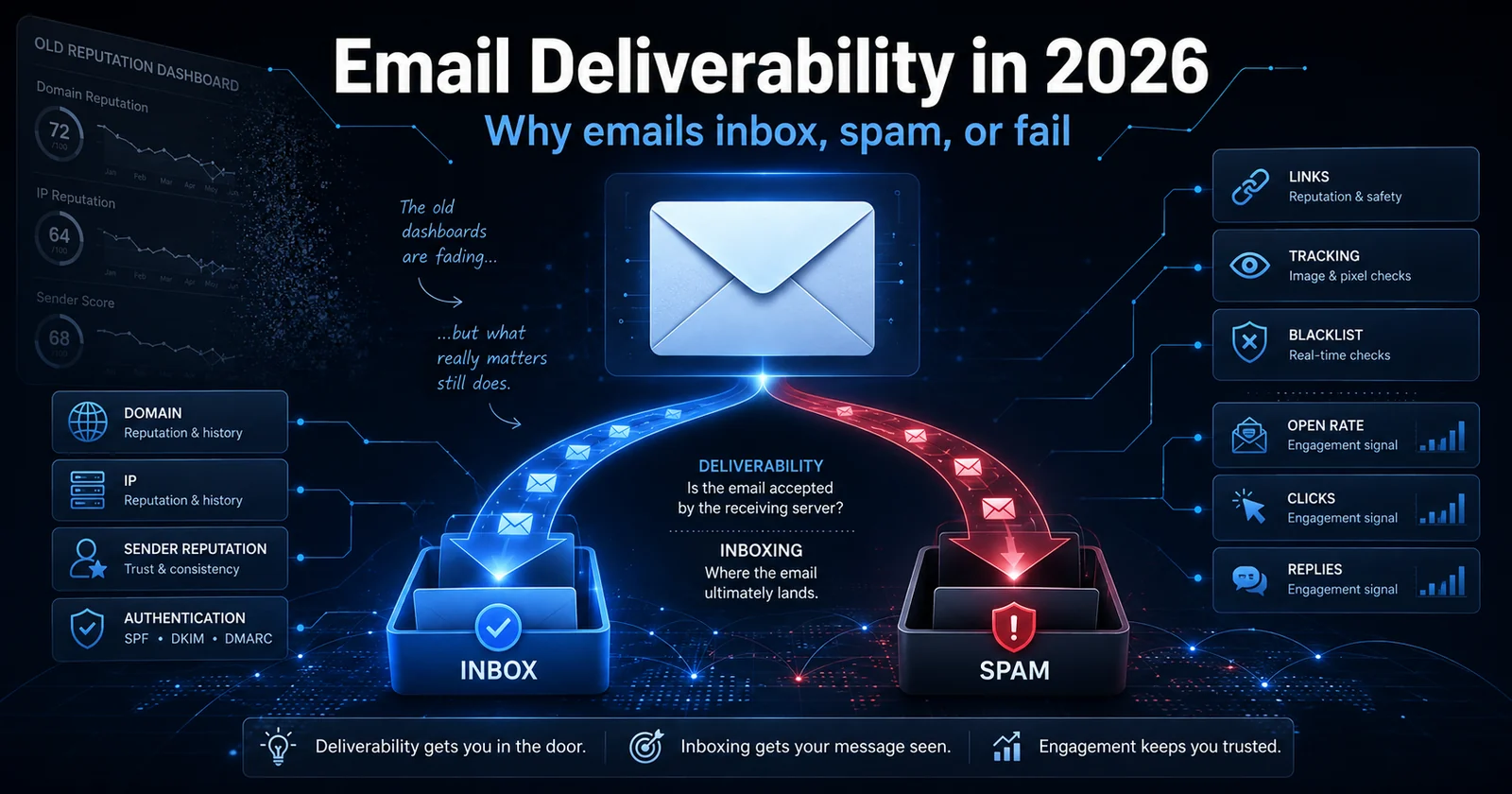
Your reputation score is disappearing. Your reputation is not.
The practical 2026 guide to email deliverability, inboxing, sender reputation, Gmail, Spamhaus, domains, IPs, links, data, and everything else that can send you to spam.
For years, one of the first places email operators went when Gmail delivery started looking strange was Google Postmaster Tools.
You checked Domain Reputation.
You checked IP Reputation.
If Google said "High," you felt pretty good.
If it said "Medium," you started watching things.
If it said "Low" or "Bad," you knew you had work to do.
That era is ending.
As of August 2026, Google has postponed the complete retirement of the legacy Postmaster Tools interface, but the direction is clear. Google's Postmaster Tools v2 does not carry forward the traditional Domain Reputation and IP Reputation dashboards. Google says those dashboards will be retired and replaced by more actionable information. Google also openly acknowledges something experienced email operators have known for years. A reputation label can be misleading because reputation is only one component of deliverability.
That does not mean domain reputation is disappearing.
It does not mean IP reputation is disappearing.
It means Google is becoming less interested in giving you a convenient label describing what it thinks your reputation is.
The underlying reputation systems are still very much alive.
In fact, Google still documents delivery errors specifically related to low IP reputation, low domain reputation, public blocklists, spam-like content, rate limits, and other reputation-related factors.
So now you need to know how to diagnose those things yourself.
That is what this guide is about.
This is not intended to be the final word on every topic below. I could write an entire article about IP warming, another about Spamhaus, another about domains, another about segmentation, another about DKIM, and another about tracking domains.
I probably will.
Consider this the master guide.
If your email is going to spam and you want to understand why, this is where I would start.
Deliverability and Inboxing Are Not the Same Thing
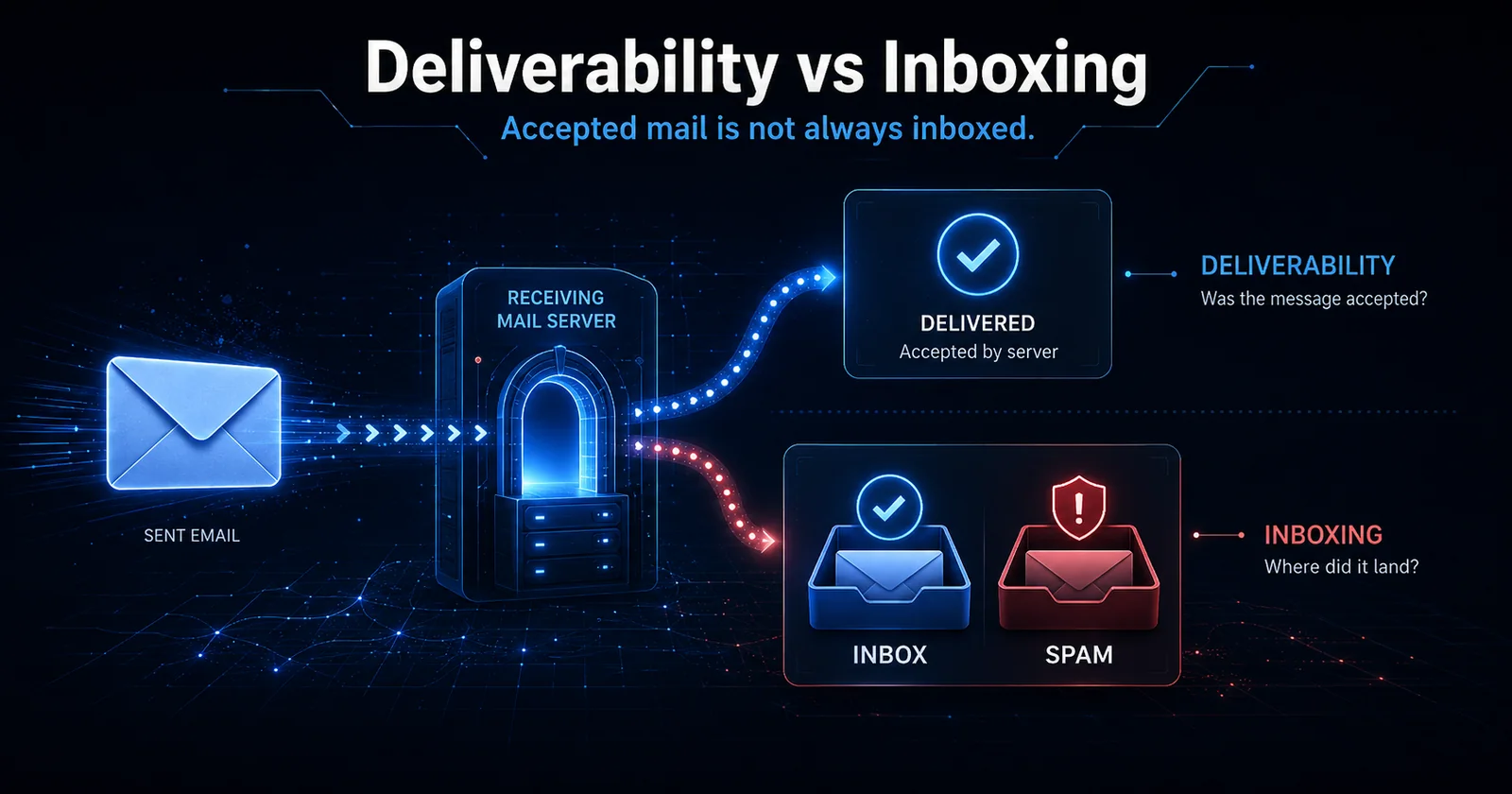
This distinction is incredibly important.
People constantly say things like this.
"My deliverability is 98%."
That usually means 98% of the messages were accepted by the receiving mail servers.
It does not mean 98% reached the inbox.
An email can be successfully accepted by Gmail with a
250 response and immediately placed in spam.
That email was delivered.
It did not inbox.
For the purposes of this article, I use the terms this way.
Deliverability means whether the receiving mail system accepted the message.
Inboxing means whether the message actually reached the primary inbox or another legitimate inbox category rather than spam.
You can therefore have fantastic technical deliverability and horrible inboxing.
That distinction matters because troubleshooting a bounce problem is completely different from troubleshooting spam placement.
If Gmail is rejecting you, look at SMTP responses, authentication, blocklists, rate limits, DNS, infrastructure, and reputation.
If Gmail is accepting everything but placing it in spam, you have a classification problem.
Those are two different problems.
Sender Reputation Is No Longer One Number
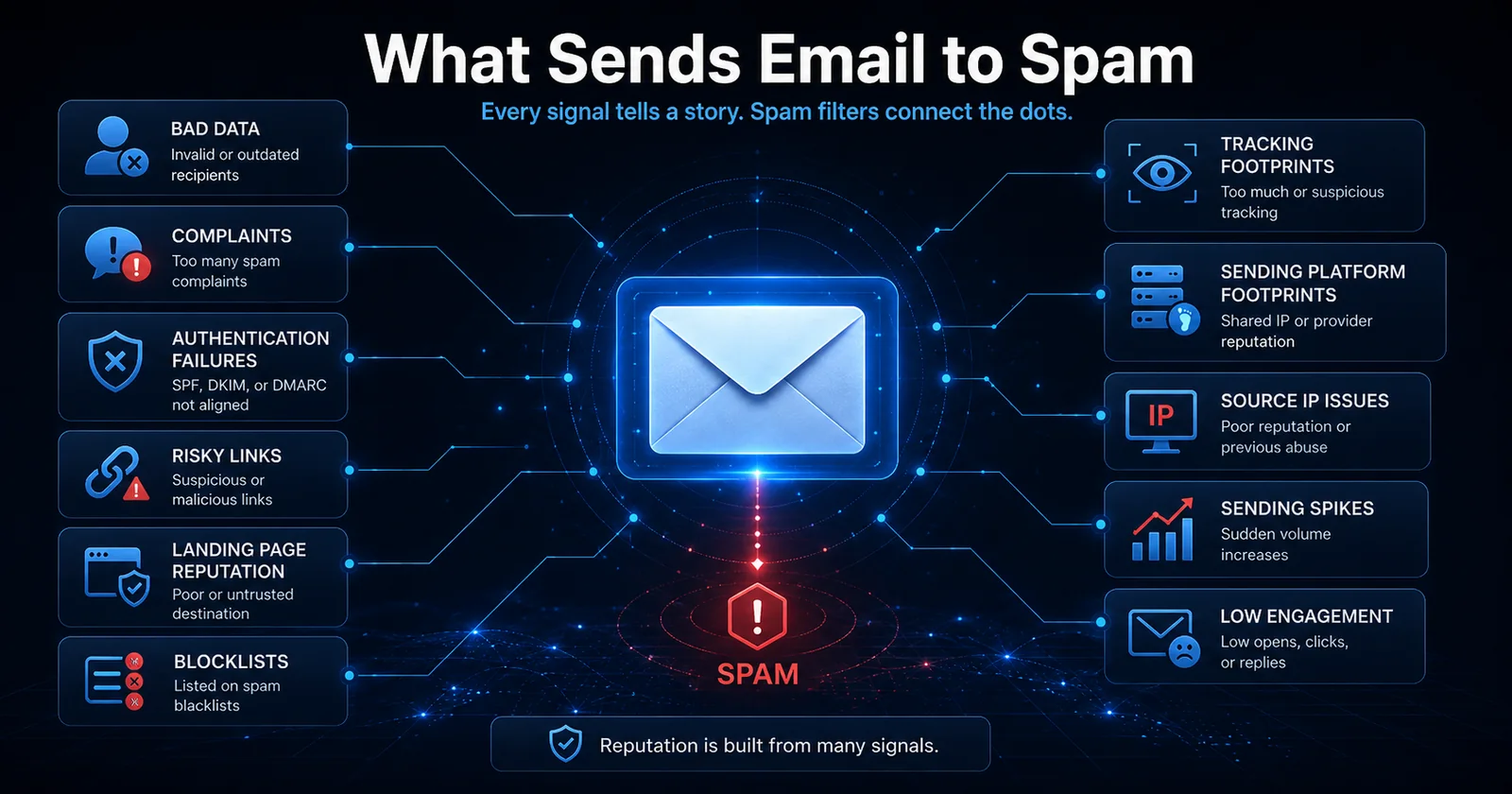
There is no single thing called "your reputation."
Modern email filtering evaluates a collection of interconnected reputations and signals.
At minimum, you should assume receivers are evaluating some combination of the following.
- Your sending IP
- Your IP range or surrounding network
- Your domain
- Your organizational or root domain
- Your DKIM signing domain
- Your envelope sender domain
- Your Return-Path domain
- Your From domain
- Your tracking domain
- Domains appearing inside your content
- Redirect domains
- Your final landing page
- Your sending platform
- Your traffic patterns
- Your sending history
- Your message construction
- Your list quality
- Recipient engagement
- Recipient complaints
- Bounce behavior
- Unsubscribe behavior
- Message content
- Message headers
- Authentication
- Your relationship with individual recipients
This is why changing an IP does not necessarily fix a problem.
It is also why changing the From domain does not necessarily fix a problem.
Filters are evaluating an ecosystem.
Think of sender reputation less like a credit score and more like a constantly changing profile.
The receiver is effectively trying to answer four questions.
Who are you?
What are you sending?
Who are you sending it to?
Do those people appear to want it?
Everything else feeds into those questions.
Authentication Is the Starting Line, Not the Finish Line
One of the biggest misconceptions in deliverability is that SPF, DKIM, and DMARC somehow make your email trustworthy.
They don't.
They make your email identifiable.
That distinction is huge.
A perfectly authenticated spammer is still a spammer.
Spamhaus makes essentially the same point. SPF, DKIM, and DMARC are important, but malicious and abusive senders can configure them too. Authentication alone does not create a good reputation.
What authentication does is allow Gmail and other receivers to confidently associate your behavior with an identity.
That identity then earns a reputation.
SPF
SPF tells a receiving system which servers are authorized to send mail for a domain.
Your SPF record needs to include every legitimate system sending mail for that domain.
A common problem occurs when someone changes ESPs, adds a CRM, adds a support platform, adds transactional infrastructure, or creates some other sending source without updating SPF.
Now part of the organization's mail passes SPF and part does not.
That is unnecessary reputation damage.
Google currently requires SPF or DKIM for all senders to personal Gmail accounts. Senders reaching bulk-sender thresholds need both SPF and DKIM.
DKIM
DKIM digitally signs the message.
It allows receivers to verify that the message was authorized by the signing domain and was not improperly modified after signing.
For Gmail, DKIM is particularly important because it provides a persistent domain identity that can follow your traffic across IP addresses.
Google requires at least a 1024-bit DKIM key for Gmail delivery and recommends 2048-bit keys when supported.
Make sure DKIM is actually passing.
Do not stop at "we published the DNS record."
Send a message.
Open the original headers.
Verify it.
DMARC
DMARC adds alignment.
Your visible From domain needs to align with the domain authenticated through SPF or DKIM for DMARC to pass.
For bulk senders to personal Gmail accounts, DMARC is required,
although Google currently allows a policy as permissive as
p=none.
DMARC reporting is also extremely useful because it tells you who is actually sending on behalf of your domain.
That occasionally reveals systems you forgot existed.
PTR and Reverse DNS
Your sending IP should have proper reverse DNS.
If your IP is 192.0.2.10, its PTR should resolve to a
legitimate hostname associated with your mail infrastructure.
That hostname should then resolve forward to the same IP.
Google explicitly requires valid forward and reverse DNS for senders.
Do not treat PTR records as cosmetic.
HELO and EHLO
Your SMTP server introduces itself.
That identity should make sense.
It should not be some generic localhost-style hostname, mismatched server name, obviously temporary VPS hostname, or something unrelated to your mail infrastructure.
Professional infrastructure should look professional from the first SMTP command forward.
TLS
Use TLS.
This is not optional for serious bulk email operations anymore.
Gmail requires TLS for bulk senders and can temporarily or permanently reject non-compliant traffic.
Message Formatting
Make sure messages comply with RFC 5322.
That includes valid headers, a valid Message-ID, sane MIME construction, proper Date headers, proper From headers, and avoiding duplicate headers that should only exist once.
Google specifically calls out malformed messages as a potential cause of delivery problems.
One-Click Unsubscribe
If you are sending marketing or promotional email at Gmail bulk-sender volumes, implement RFC-compliant one-click unsubscribe.
That does not simply mean putting the word "unsubscribe" at the bottom of your message.
The appropriate List-Unsubscribe infrastructure and headers need to exist.
Google requires one-click unsubscribe for marketing and subscription messages sent by bulk senders.
Authentication Does Not Guarantee Inboxing
You can have all of this.
- SPF passes
- DKIM passes
- DMARC passes
- PTR is correct
- TLS works
- One-click unsubscribe works
- The message is RFC compliant
And Gmail can still put everything in spam.
Why?
Because authentication answers this question.
"Who sent this?"
It does not answer this question.
"Do Gmail users want this?"
That second question is where reputation begins.
Data Quality Is Probably More Important Than You Think
If I had to pick the variable that destroys more sending programs than almost anything else, it would be bad data.
People obsess over IPs.
They obsess over domains.
They obsess over subject lines.
Then they send the same garbage list through the new IP and new domain.
Three days later they wonder why the new setup is ruined.
Your recipients are part of your reputation.
Bad data can produce some combination of the following.
- Hard bounces
- Unknown users
- Spam traps
- Long-inactive mailboxes
- Low engagement
- Low clicks
- Low replies
- High complaint rates
- Unsubscribes
- Deletions without engagement
- Messages ignored repeatedly
A perfectly warmed IP cannot indefinitely overcome recipients telling Gmail that they do not care about your mail.
You cannot infrastructure your way out of a fundamentally bad audience.
Complaints Matter Enormously
Google currently recommends keeping the user-reported spam rate in Postmaster Tools below 0.10% and avoiding 0.30% or higher. Gmail's bulk sender enforcement uses 0.30% as an important threshold, but Google explicitly says even rates above 0.10% can negatively impact inboxing.
That means one complaint per thousand inboxed messages is already something you should watch.
Three per thousand is not something I would casually ignore.
There is another catch.
Postmaster Tools spam rate can look artificially wonderful when Gmail is already putting most of your mail in spam.
Why?
Because Gmail calculates that metric from messages delivered to inboxes and subsequently marked as spam.
If Gmail automatically sends most of your traffic to spam, fewer recipients have an opportunity to hit the spam button on inboxed mail.
Google explicitly warns about this. A suspiciously low spam rate can sometimes mean Gmail is already filtering a large percentage of your traffic before users ever see it.
A 0.00% complaint rate does not automatically mean you are healthy.
Context matters.
Open Rates Still Matter, but Not the Way They Used To
Google states that it does not track open rates and cannot verify open-rate data reported by third parties.
That does not mean opens are useless.
It means you should stop treating an open rate as a perfectly accurate measurement of human engagement.
Privacy systems, proxy image loading, bot activity, image caching, and tracking protection have made opens increasingly noisy.
I still watch them.
I just watch the trend more than the exact number.
For a mailing list that I believe is healthy, I would much rather see a measured open rate consistently above 30% than one sitting around 10% to 15%.
That does not mean 30% is a Gmail requirement.
It is not.
Different industries, message types, audiences, and tracking systems can produce wildly different numbers.
The useful question is this.
"What is normal for this particular stream, and is that number getting better or worse?"
If your normal tracked open rate is 38% and it suddenly becomes 19%, something changed.
Investigate.
Clicks Are a Better Signal When the Email Contains a Link
If the purpose of the message is to get someone to click, watch clicks.
Clicks generally represent stronger intent than an open.
A recipient may open by accident.
A privacy system may generate an open.
A click usually requires something more.
That said, security scanners and automated systems can also visit links, so click data is not perfectly clean either.
Again, watch your baseline.
If a campaign usually generates healthy clicks and suddenly generates almost none, I care.
If you are sending link-heavy promotional mail and supposedly getting massive opens with almost no clicks, I would question how meaningful those opens actually are.
If There Are No Links and No Open Tracking, Watch Replies
Sometimes I intentionally want a message with almost nothing measurable inside it.
No tracking link.
No open pixel.
Maybe no link at all.
In that case, replies become extremely useful.
A reply is an unmistakably strong form of engagement.
If people are replying to you, they are interacting with the sender.
For conversational mail, sales outreach, relationship-based newsletters, or mail designed specifically to create dialogue, I care far more about replies than pixel-based opens.
There is no universal "good reply rate" because a newsletter, political appeal, ecommerce promotion, and one-to-one sales message are completely different products.
What matters is establishing your normal reply rate and protecting it.
Plain Text Is One of My Favorite Deliverability Tests
When I want to know whether a domain and IP can inbox, I like stripping the message down.
Start with plain text.
No images.
No HTML template.
No buttons.
No tracking pixel.
No click-tracking redirect.
No affiliate link.
No complicated footer.
No remote assets.
No marketing template.
Just legitimate, human-readable text.
Why?
Because you have removed an enormous number of variables.
A plain-text diagnostic email does not magically receive a Gmail "plain text bonus."
Google does not publish such a rule.
But plain text frequently performs better during diagnosis because there is simply less that can be wrong.
You have removed links.
You have removed redirect chains.
You have removed tracking domains.
You have removed image hosts.
You have removed questionable HTML.
You have removed template fingerprints.
You have removed hidden CSS problems.
You may have removed platform tracking.
That makes plain text an incredibly useful control.
Google itself notes that internet links can increase the possibility of a message being treated as spam.
HTML Introduces More Things That Can Go Wrong
HTML email can inbox beautifully.
Billions of HTML emails reach inboxes every day.
The problem is not "HTML equals spam."
The problem is that HTML introduces additional signals.
A typical commercial HTML email may contain all of this.
- Open-tracking pixel
- Click-tracking domain
- Image CDN
- Multiple destination domains
- Redirect parameters
- List-Unsubscribe links
- View-in-browser links
- Social links
- Tracking parameters
- Template-specific HTML
- Platform-specific headers
- Hosted images
- CSS
- Tracking identifiers
Every one of those is another variable.
That is why my diagnostic sequence is usually additive.
How I Test Whether a Setup Can Inbox
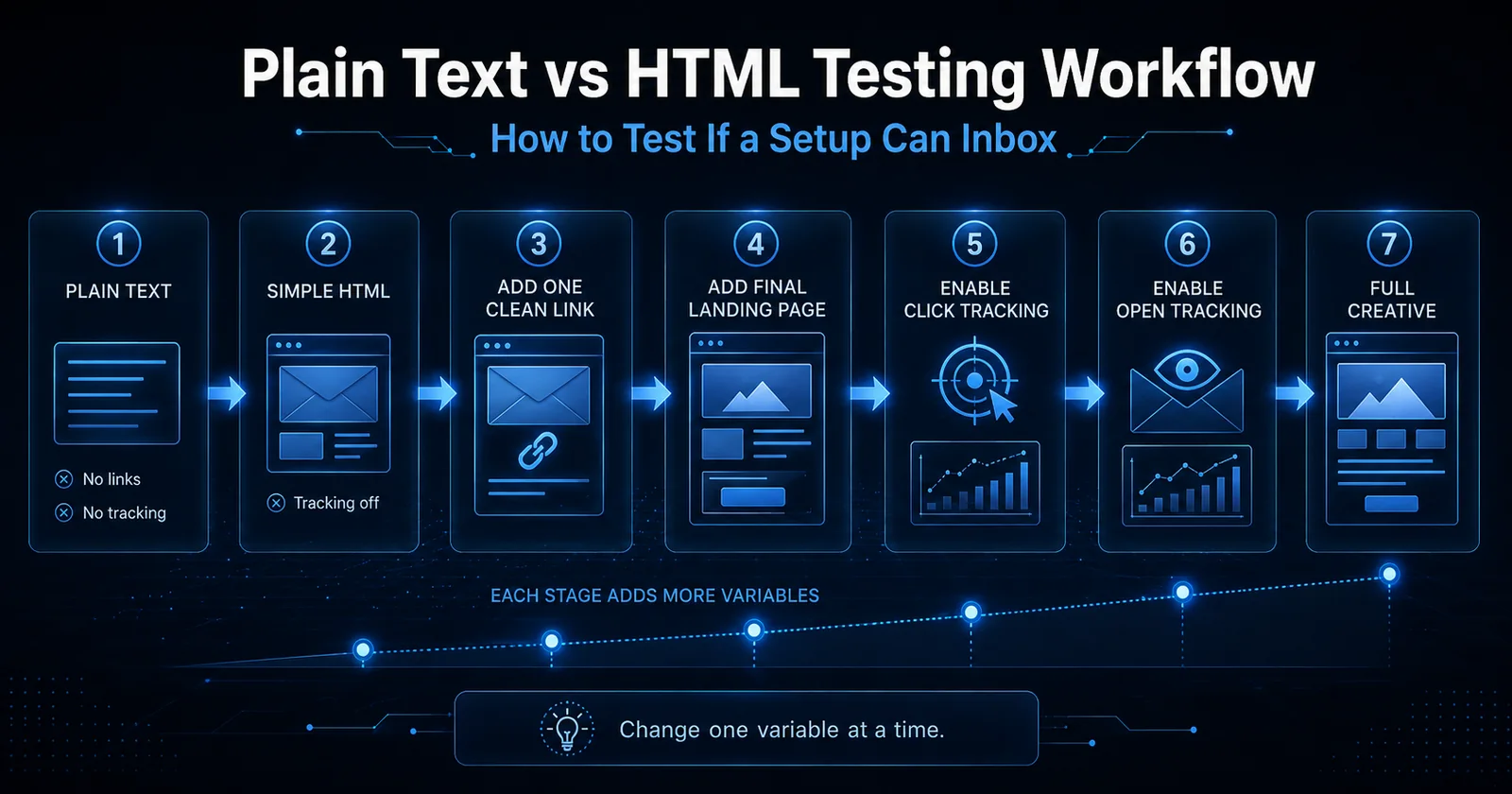
Do not change eight things at once.
Change one category at a time.
Test 1
Send plain text with no links and no tracking.
If that spams, I immediately become more suspicious of the IP, domain, data, authentication, sending pattern, or broader infrastructure.
Test 2
Send simple HTML with tracking disabled.
No links yet.
If plain text inboxes but simple HTML spams, investigate the message construction and platform.
Test 3
Add one clean first-party link.
Use a domain you trust.
If inboxing deteriorates, investigate the linked domain.
Test 4
Add the final landing page you actually intend to use.
Test 5
Enable click tracking.
Test 6
Enable open tracking.
Test 7
Introduce the full production creative.
At each stage you are asking one question.
"What changed when placement changed?"
That is far more useful than sending ten completely different creatives through three domains and four IPs and trying to infer something from the chaos.
Tracking Links Can Hurt You
Most ESPs rewrite links.
You think the email contains this.
https://example.com/article
The recipient may actually receive something functionally closer to this.
https://track.example-mail.net/c/abc123...
That URL redirects to the final page.
The tracking domain is now part of your message.
Its reputation matters.
If it is shared with other senders, their behavior may matter.
If it has been heavily abused, that matters.
If the domain was recently registered and suddenly appears in huge volumes of commercial mail, that can matter.
If the redirect ultimately lands on something questionable, that can matter too.
Turning off click tracking is therefore one of the first things I test when placement suddenly collapses.
The Final Landing Page Matters Too
Do not assume the only URL that matters is the one visible in the email.
Email security systems analyze links.
Google operates link-protection systems specifically because URLs inside messages can lead users to malicious or unwanted destinations.
Spamhaus' DBL is also specifically designed to evaluate domains appearing in email content and headers, including domains used in URLs.
Assume filters can care about the entire path.
That may include the following.
- The visible URL
- Your tracking domain
- Intermediate redirects
- Affiliate redirects
- The final landing page
- Domains loaded by that landing page
- Infrastructure historically associated with those domains
This creates a problem I see surprisingly often.
The sending domain is clean.
The IP is clean.
SPF passes.
DKIM passes.
The email itself looks fine.
But every message contains a link to a domain with a terrible history.
Changing the sending IP will not fix that.
Content Still Matters
There was a time when people talked about "spam words" like the filter was simply counting how many times you used "FREE" or how many exclamation points appeared in the subject line.
Modern filtering is far more sophisticated.
There is no magical list of words that automatically sends a message to spam.
Context matters.
That does not mean content is irrelevant.
Gmail explicitly documents "email content is possibly spammy" as a delivery problem and notes that links can contribute to classification.
Things I would watch include the following.
- Misleading subject lines
- Fake
Re:orFwd:subjects - Deceptive display names
- Hidden HTML
- Hidden text
- Obfuscated content
- Link destinations that do not match expectations
- Suspicious attachments
- Image-only messages
- Extremely malformed HTML
- URL shorteners
- Excessive redirects
- Misleading buttons
- Phishing-like language
- Impersonation
- Strange character substitutions
- Brand mismatches
- Content radically different from your normal traffic
Google specifically warns against deceptive headers, misleading display names, fake reply-style subjects, hidden HTML and CSS, and links where users cannot understand what they are clicking.
The important point is that content reputation and sender reputation interact.
A strong sender can sometimes survive mediocre content.
A weak sender may not.
What Is an Email Footprint?
This is one of the most important concepts in modern deliverability.
A footprint is the collection of technical and behavioral signals that allows receiving systems, reputation companies, blocklists, and security systems to associate one stream of email with another.
A footprint is not automatically bad.
In fact, legitimate senders should have consistent footprints.
Your DKIM identity is a footprint.
Your From domain is a footprint.
Your IP is a footprint.
Consistency helps receivers understand who you are.
The problem is a bad footprint.
A bad footprint associates your mail with infrastructure, domains, URLs, platforms, or behavior that already has a poor reputation.
Examples of Sending Footprints
A receiving system may be able to correlate traffic through things such as these.
- Sending IP
- IP range
- ASN
- Reverse DNS
- HELO hostname
- DKIM domain
- DKIM selector patterns
- Envelope sender
- Return-Path
- Bounce domain
- From domain
- Reply-To domain
- Message-ID hostname
- Message-ID format
- Tracking domain
- Tracking URL structure
- Image-hosting domain
- List-Unsubscribe domain
- List-ID
- X-Mailer
- ESP-specific X headers
- MIME construction
- Header ordering
- Template HTML
- Redirect patterns
- URL parameters
- Source IPs exposed inside Received headers
- Platform relay hostnames
- Landing pages
- Sending cadence
- Similar creatives
- Similar recipient populations
You do not need to assume every provider uses every signal.
The point is that changing the visible From domain does not necessarily make you a completely different sender.
Sending Platform Footprints Matter
This deserves special attention.
Suppose an ESP has thousands of customers.
Messages from those customers might share certain technical characteristics.
Perhaps they use similar bounce domains.
Perhaps Message-ID construction is similar.
Perhaps the same tracking infrastructure appears repeatedly.
Perhaps mail travels through recognizable relay hosts.
Perhaps custom headers identify the platform.
None of that is necessarily bad.
Large legitimate platforms have obvious footprints too.
The problem is what happens when a platform becomes heavily associated with low-quality traffic.
If a provider repeatedly attracts bad senders, receivers can become cautious about traffic associated with that infrastructure.
This is one reason changing from one sending platform to another can occasionally change placement even when your own domain remains unchanged.
Source IPs Inside the Message Can Matter
Do not look only at the IP making the final SMTP connection.
Open the raw source.
Look at the complete Received: chain.
Some sending systems expose upstream injection servers.
Some expose internal hostnames.
Some expose originating IP addresses.
Some reveal relay infrastructure belonging to another provider.
Those signals may give receiving systems additional context.
If an upstream platform has a terrible history, hiding behind a new outbound IP does not necessarily erase every relationship with that infrastructure.
Again, the answer is not to start manipulating headers to conceal who you are.
That creates a completely different problem.
The answer is to use clean infrastructure.
Do Not Try to Hide Your Footprint
This is where some operators make a huge mistake.
They learn about footprints and conclude that the solution is randomization.
Random Message-IDs.
Constantly changing domains.
New tracking hosts.
Rotating IPs.
Changing DKIM selectors constantly.
Different hostnames every few days.
Random From addresses.
That does not necessarily make you invisible.
It can make you look like a snowshoe spammer.
Legitimate mailers generally benefit from durable, understandable identities.
Reputation is an asset.
You want to build it.
Not continuously throw it away.
What Is Snowshoe Spamming?
The term comes from an actual snowshoe.
A snowshoe spreads a person's weight across a large surface area so they do not sink deeply into snow.
Snowshoe spamming applies the same idea to email.
Instead of sending a large volume from a small number of recognizable IPs and domains, the sender spreads that traffic across large numbers of IPs and domains.
The idea was to dilute reputation.
Rather than send 1,000,000 messages from one identity, a sender might historically try spreading traffic across dozens or hundreds of IPs and domains so each one appeared to have lower volume.
Spamhaus defines snowshoe spam in essentially these terms. The technique spreads spam across many IPs and domains to dilute reputation metrics and evade filtering. Spamhaus also specifically warns that domains behaving like snowshoers can be treated like snowshoers.
This used to work much better than it does today.
Modern filtering systems correlate infrastructure.
Creating 100 mediocre domains does not give you 100 trustworthy identities.
It may simply give the receiving system 100 reasons to believe you are trying to avoid reputation.
Too Many Domains Can Be Worse Than One Good Domain
I regularly see senders terrified of putting volume through one domain.
So they build enormous domain farms.
That can be exactly backwards.
Reputation requires history.
A domain that sends legitimate, wanted email consistently for years can become extremely valuable.
A collection of constantly rotating domains has very little opportunity to build durable trust.
Spamhaus specifically notes that reputable bulk senders invest time into persistent domains and IPs and therefore tend to use fewer of them than snowshoe operations.
Google's own sender guidance also says that, ideally, senders should send messages from the same IP address and maintain consistent traffic patterns.
The old strategy was often this.
"The domain went bad. Throw it away."
Then another.
Then another.
Then another.
Eventually the rotation itself becomes part of the reputation problem.
Yes, You Can Send More Than One Million Emails From One IP
There is no rule saying a high-volume sender needs dozens of IP addresses.
A properly warmed dedicated IP with good recipient engagement, stable traffic, strong authentication, clean infrastructure, and established history can handle enormous volume.
That can include more than one million messages per day.
That can even mean very large volumes primarily or entirely destined for Gmail.
The SMTP capacity of a modern mail server is usually not the interesting part.
Receiver trust is.
Gmail can throttle traffic.
It can defer mail.
It can adjust limits based on IP and domain behavior.
Google explicitly says it tracks volume and limits at both domain and IP levels and recommends gradual increases and consistent sending rates.
There is therefore no magical statement like this.
"One IP can send exactly 500,000 Gmail messages."
It does not work that way.
A sender with excellent history may be able to push volumes that would destroy a brand-new IP.
Gmail Does Not Have a Published "Test 10,000 Then Release the Rest" Rule
People often notice something interesting during large campaigns.
The first portion inboxes.
Then placement changes.
Or the first portion spams and later traffic improves.
Or Gmail begins deferring traffic partway through a campaign.
This leads to theories like this.
"Gmail tests the first 10,000 messages."
Or 5,000.
Or 20,000.
Or 50,000.
I would not build an operating strategy around any fixed number.
Google does not publish a universal test batch.
What Gmail clearly does is continuously evaluate traffic.
Volume matters.
Recipient feedback matters.
Sending speed matters.
Authentication matters.
Reputation matters.
Gmail also applies rate limits and temporary failures when traffic appears suspicious. Google recommends consistent sending instead of bursts and explicitly tells senders to gradually increase volume.
Think of Gmail as continuously reevaluating the stream rather than conducting one single test.
This explains why a campaign can start well and deteriorate.
Your reputation is not frozen when the first message leaves the server.
Seed Testing Is Useful, but Seeds Are Not the Truth
I use seed accounts.
I like seed testing.
I would never use seed placement as the sole definition of my reputation.
Seeds have limitations.
A seed Gmail account does not necessarily behave like a normal recipient.
It may have little historical interaction with you.
It may receive unusual amounts of test email.
Its mailbox behavior may be artificial.
The relationship between that account and your sender can differ dramatically from the relationship between your sender and a real subscriber.
Gmail also personalizes filtering.
A recipient who regularly opens your mail may see inbox placement while someone who has ignored you for six months sees spam.
This means you can send the exact same message through the exact same infrastructure and receive different placement for different recipients.
Seeds give you evidence.
They do not give you absolute truth.
How I Use Seeds
I am looking for patterns.
If ten Gmail seeds spam simultaneously after a domain change, I care.
If one of ten spams, I care less.
If plain text inboxes everywhere but the production creative spams everywhere, that is valuable information.
If Domain A spams across multiple known-good IPs while Domain B inboxes through those same IPs, that is valuable information.
Seeds become powerful when you use them as part of controlled testing.
They become dangerous when you treat one mailbox as an oracle.
Blacklists and Blocklists
The terms "blacklist," "blocklist," DNSBL, and RBL are frequently used interchangeably.
The industry increasingly prefers "blocklist."
A blocklist is essentially a reputation dataset containing IP addresses, domains, or other identifiers associated with unwanted or risky behavior.
Receiving systems can query those datasets and decide what to do.
They may reject the mail.
They may place it in spam.
They may increase its spam score.
They may simply use the listing as one signal among many.
Spamhaus explains that its blocklists can be used either to reject mail in real time or to tag mail for additional filtering.
Not every blacklist matters equally.
Being listed on some obscure DNSBL that virtually nobody uses may have no meaningful impact.
Being listed by Spamhaus is a very different situation.
The Spamhaus Lists You Should Understand
Spamhaus maintains several different datasets.
SBL
The Spamhaus Blocklist focuses on IP addresses associated with spam sources and related abuse.
CSS
Combined Spam Sources focuses heavily on IPs associated with low-reputation SMTP traffic.
Spamhaus specifically says potential CSS triggers include unsolicited email, poor marketing list hygiene, compromised systems, and snowshoe behavior.
XBL
The Exploits Blocklist focuses on compromised systems and malware-related activity.
PBL
The Policy Blocklist includes IP space that generally should not be sending mail directly to recipient MX servers, such as many residential broadband ranges.
ZEN
ZEN combines several Spamhaus IP-oriented datasets into one query system.
DBL
The Domain Blocklist is different.
DBL is for domains.
Spamhaus describes DBL as a list of domain names with poor reputation. Those domains may appear in email headers, URLs, or other message components.
That distinction matters.
Checking your IP and seeing "clean" does not mean the domains inside your message are clean.
How to Check Your IP and Domain Against Blocklists
I usually start with three things.
Spamhaus Reputation Checker
Check the sending IP.
Check the sending domain.
Check important tracking and landing domains where appropriate.
Spamhaus provides its own IP and Domain Reputation Checker specifically for this purpose.
MXToolbox
MXToolbox can check an IP against a large number of DNS-based blocklists and is useful as a broad first pass.
MultiRBL
MultiRBL is another useful way to see listings across many DNSBLs and can also help identify reverse DNS issues.
Do not just count listings.
Ask which list you are on.
Ask why.
Ask how widely that list is used.
Ask whether your SMTP rejection messages reference it.
One serious listing is more important than twenty irrelevant ones.
Spamhaus Probably Knows More About You Than You Think
There is a common assumption among senders that if they avoid obvious spam traps, Spamhaus cannot see them.
I would not make that assumption.
Spamhaus says its reputation systems use many sources, automated systems, heuristics, intelligence partnerships, machine learning, manual investigations, and large-scale visibility into email activity. It intentionally does not reveal all listing criteria or data sources.
There is also a common operator theory that moving traffic exclusively to Gmail can reduce exposure to external trap networks.
There may be situations where a sender observes exactly that.
But I would not turn the observation into the statement that Spamhaus has "no Gmail seeds."
Spamhaus does not publish enough information about its data collection for anyone outside Spamhaus to responsibly guarantee that.
What I am comfortable saying is this.
A Spamhaus listing and Gmail's internal reputation are two different things.
You can have a Spamhaus problem and still inbox Gmail.
You can be completely clean on Spamhaus and spam at Gmail.
A public blocklist is not Gmail's internal reputation database.
Should You "Just Mail Gmail" to Get Off Spamhaus?
I have seen cases where a sender stops the traffic that appears to be triggering an external reputation system, continues sending a cleaner subset elsewhere, and eventually sees a listing disappear.
Some operators interpret this as "mail Gmail until Spamhaus forgets about you."
I would treat that as an observation, not a guaranteed delisting procedure.
Spamhaus' official guidance is to stop the behavior causing the listing, correct the problem, use its Reputation Checker, and follow the removal instructions associated with the listing. Many DBL listings also expire automatically after the activity that triggered them stops.
If sending only clean, wanted Gmail traffic happens to be part of your recovery process, fine.
But do not assume you have discovered an invisible lane where Spamhaus cannot observe anything you do.
That is too strong a claim.
Domain Reputation and IP Reputation Affect Each Other
Another mistake is treating domain and IP reputation like completely independent universes.
They are not.
Spamhaus explicitly notes that domain and IP reputations affect each other.
Email receivers can also correlate them.
If ten terrible domains repeatedly appear on the same IP, what does that say about the IP?
If one supposedly "clean" domain repeatedly moves from one terrible IP to another, what does that say about the domain?
Reputation is relational.
That is another reason indiscriminate rotation is dangerous.
How Subdomain Reputation Actually Works
People often ask this.
"If example.com is bad, can I just send from mail.example.com?"
Maybe.
But do not think of a subdomain as a completely unrelated identity.
A subdomain can build its own sending history.
news.example.com can develop signals that differ from
transactional.example.com.
That functional separation can be useful.
But receivers can still understand that both belong to
example.com.
Google explicitly aggregates the bulk sender threshold across the
same primary domain. If example.com and
promotions.example.com together cross Gmail's bulk-sender
threshold, Google treats the primary domain as the common identity for
that calculation.
Spamhaus DBL also has root-domain implications. If a domain is listed at the registrable level, subdomains of that domain can return the same DBL result.
So no, a subdomain should not be viewed as a magic reputation reset.
When a Subdomain Makes Sense
Use subdomains when you want logical separation while maintaining the same organizational identity.
For example.
news.example.comoffers.example.comreceipts.example.comalerts.example.com
This can help separate traffic streams.
Promotional mail behaves differently from password resets.
Password resets should not suffer because a marketer accidentally sent an aggressive promotion to an old segment.
Google and Yahoo both recommend separating different mail types in various ways, including IP or sending identity separation.
That is legitimate reputation management.
When a Completely New Domain Makes Sense
A separate domain can make sense when you genuinely want an independently managed identity.
Maybe it is a different brand.
Maybe it is a separate business unit.
Maybe you need strong risk separation.
Maybe the original domain has sustained serious reputation damage.
Maybe the root domain itself is on a domain blocklist.
What I would not do is create new domains every week because yesterday's domain stopped inboxing.
That is exactly the operational pattern you do not want.
When to Swap an IP
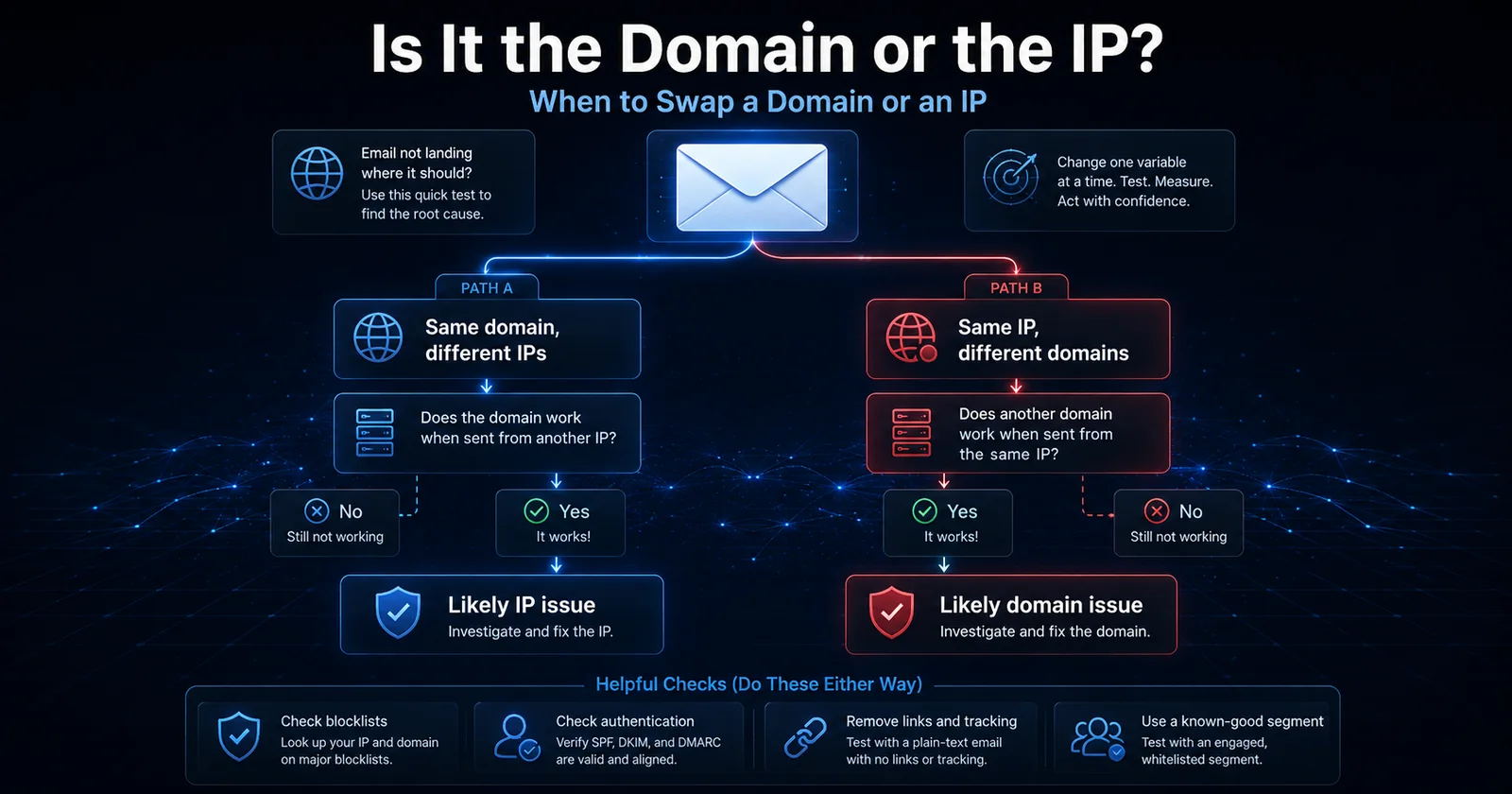
Do not replace an IP because one Gmail seed went to spam.
Diagnose first.
A strong indication of an IP problem looks like this.
Domain A + IP 1 spams
Domain A + IP 2 inboxes
Keep the following as controlled as possible.
- Same domain
- Same creative
- Same links
- Same recipient quality
- Same sending rate
- Same authentication
If changing only the IP consistently changes placement, the IP becomes the obvious suspect.
Additional evidence includes the following.
- IP-specific SMTP deferrals
- IP blocklist listings
- Low-IP-reputation errors
- Other domains failing on the same IP
- The same domain performing normally through a proven clean IP
At that point, moving traffic may make sense.
When to Swap a Domain
Now reverse the test.
Domain A + IP 1 spams
Domain A + IP 2 spams
But this happens.
Domain B + IP 1 inboxes
Domain B + IP 2 inboxes
Now the domain becomes much more suspicious.
Before throwing it away, test plain text.
Remove links.
Remove tracking.
Check DKIM.
Check SPF.
Check DMARC.
Check the domain against Spamhaus DBL.
Check the root domain.
Check landing pages.
Check sending history.
Check whether the domain was previously used.
If the domain continues failing across multiple known-good IPs with simple, clean messages while another domain works through those same IPs, replacing the domain may be justified.
The Simple Domain and IP Diagnostic Matrix
| Result | Likely Direction |
|---|---|
| Same domain fails on several proven IPs | Investigate domain, content, URLs, data |
| Same domain works immediately on another proven IP | Investigate original IP |
| Multiple domains fail on one IP | Investigate IP or network |
| One domain fails while another works on the same IP | Investigate failing domain |
| Everything works until one URL is added | Investigate URL, redirect, landing page |
| Plain text works but tracked HTML fails | Investigate content, tracking, platform footprint |
| Every setup fails on the same recipient segment | Investigate data |
| Everything deteriorates after a volume jump | Investigate pacing and reputation response |
This is far more useful than guessing.
If the Same Domain Fails Across Multiple IPs
Assuming your testing is controlled, I become increasingly suspicious of the domain.
That includes domains related to the message, not merely the visible From address.
Maybe the problem is the From domain.
Maybe it is the DKIM domain.
Maybe it is the tracking domain.
Maybe it is the landing domain.
Maybe the entire root domain has developed a bad reputation.
You need to isolate them.
If the Domain Works Through Another IP
Then the original IP deserves serious scrutiny.
That does not automatically mean it is permanently dead.
Maybe you pushed volume too fast.
Maybe it needs recovery.
Maybe it inherited history from a previous tenant.
Maybe another customer used the IP before you.
Maybe it sits inside a problematic network.
Maybe the reputation is temporarily low.
But at least you now know the domain is capable of inboxing through other infrastructure.
That is valuable.
The Data Test Nobody Wants to Perform
Sometimes everything is clean.
Then you change the recipients.
Suddenly you inbox.
That tells you something nobody wants to hear.
Your infrastructure was not the problem.
Your list was.
This is why I always want a known-good engaged segment available for testing.
Without that control, you can waste days moving infrastructure around when the recipients are actually destroying the campaign.
My 10% Rule for Questionable Data
Let me define "questionable" first.
I mean data where I have less confidence than I do in my established engaged audience.
Maybe it is older.
Maybe the source is less proven.
Maybe it has lower historical engagement.
Maybe I am testing a new acquisition source.
I generally do not want that data suddenly becoming half of my traffic.
My operating rule is roughly 10%.
If I have a healthy established stream and I am going to test lower-confidence data, I do not want it representing more than roughly 10% of the day's volume.
And 10% is a ceiling.
It is not a promise that you can add 10% garbage every day forever.
If engagement takes a beating, stop.
If clicks collapse, stop.
If replies collapse, stop.
If complaints rise, stop.
If bounces rise, stop.
If Gmail placement deteriorates, stop.
Your reputation tells you how much experimentation it can tolerate.
Also remember that provider policies and applicable laws still matter. Google explicitly advises senders not to purchase email addresses and not to send messages to people who did not sign up to receive them.
So do not interpret my 10% rule as permission to ignore consent or provider policies.
It is a reputation-risk rule for testing lower-confidence segments within an otherwise healthy operation.
How to Maintain Good Engagement
Do not wait for a deliverability emergency before segmenting.
Build engagement segmentation from the beginning.
Useful populations can include the following.
- Clicked within 7 days
- Clicked within 14 days
- Clicked within 30 days
- Clicked within 60 days
- Opened within 7 days
- Opened within 14 days
- Opened within 30 days
- Replied recently
- Purchased recently
- Converted recently
- Signed up recently
- Active subscribers
- Long-term inactive recipients
Clicks, replies, purchases, and conversions are generally more meaningful to me than opens alone.
Open data is still useful.
It just needs context.
What to Do When Emails Start Going to Spam
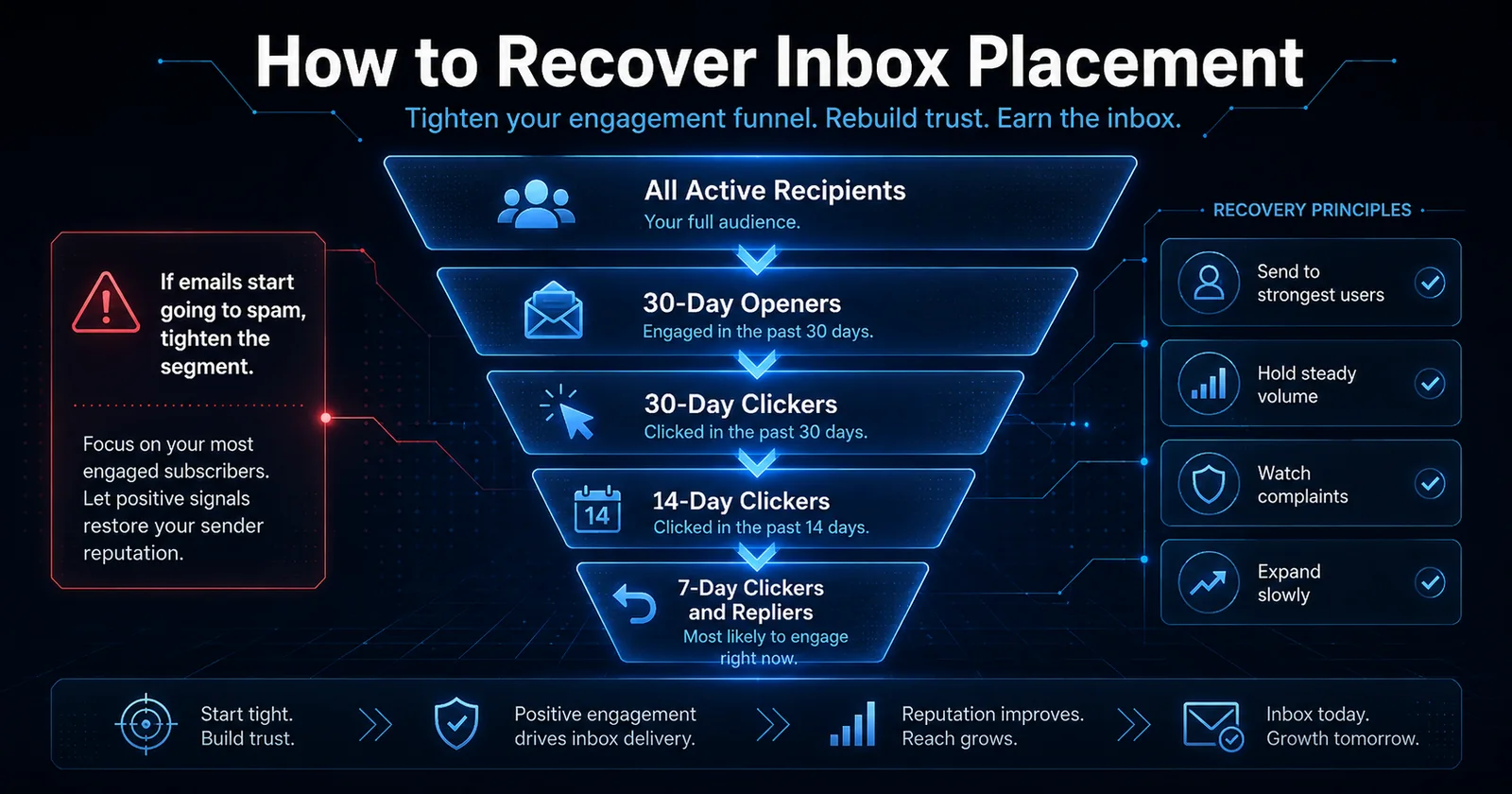
Do not panic and immediately change everything.
That destroys your ability to identify the problem.
Start reducing risk.
Mild Deterioration
Maybe some seeds are shifting.
Maybe open rates softened.
Maybe clicks declined.
Maybe Gmail placement is less consistent.
Tighten your segment.
Move toward people who engaged within the last 30 days.
Reduce questionable data.
Watch complaints.
Watch temporary failures.
Keep volume steady rather than violently turning traffic on and off.
Clear Spam Placement
If Gmail is clearly pushing a meaningful percentage of traffic into spam, tighten harder.
Start with recent clickers, repliers, buyers, converters, and highly engaged recipients.
A 14-day engagement window may make sense.
If the situation is serious, go tighter.
Severe Reputation Damage
When placement has collapsed, I want the strongest possible audience.
That might mean 7-day clickers and repliers.
It might mean very recent purchasers.
It might mean active subscribers with repeated engagement.
The exact number of days is not sacred.
The principle is.
As reputation gets worse, recipient quality needs to get better.
Do Not "Warm" a Broken Reputation With Bad Data
This sounds obvious, yet people do it constantly.
They discover an IP is struggling.
Then they continue pushing the full database through it because "we need volume to warm it."
That is not warming.
That is reinforcement.
The receiver sees more unwanted behavior and becomes increasingly confident that its original classification was correct.
Warm with your best recipients.
Recover with your best recipients.
Expand only after the strongest traffic performs correctly.
Reputation Recovery Should Be Earned
I generally think of recovery as a ladder.
- Start with the strongest engagement cohort.
- Send consistently.
- Verify inbox placement.
- Watch complaints.
- Watch clicks or replies.
- Watch SMTP responses.
- Expand the audience slightly.
- Repeat.
- Stop expanding when metrics deteriorate.
Do not decide in advance that you are increasing volume 100% every day no matter what happens.
The audience decides whether you deserve the next step.
Building Reputation on a New Domain and IP
A completely new domain on a completely new dedicated IP is the most difficult starting point because almost everything is unknown.
Before sending production traffic, make sure the technical foundation is complete.
Preflight Checklist
- SPF passes
- DKIM passes
- DMARC exists
- PTR is correct
- Forward DNS matches
- HELO is sensible
- TLS works
- Message-ID is valid
- From alignment is correct
- Bounce handling works
- Complaints can be processed
- One-click unsubscribe works when required
- Tracking domain is clean
- Landing domain is clean
- IP is not blocklisted
- Domain is not blocklisted
- Postmaster Tools is configured
- Sending rate is controlled
- Feedback IDs are configured when useful
Then begin with your best recipients.
Not random people.
Not your oldest segment.
Not the file somebody bought three years ago.
Your best recipients.
Do Not Obsess Over an Exact Warming Schedule
I have seen warming guides that say things like this.
Day 1 sends exactly X.
Day 2 sends exactly Y.
Day 3 sends exactly Z.
That creates false confidence.
A mature brand moving an established domain onto a fresh IP is very different from a brand-new domain sending unknown data from a brand-new IP.
Google does not publish a universal warming calendar.
It tells senders to start with low volume, send to engaged users, increase gradually, maintain consistent rates, and monitor the response.
That is how I look at warming.
Your ramp should be conditional.
If everything looks fantastic, expand.
If metrics weaken, hold.
If placement collapses, reduce.
Consistency Is Hugely Important
A common bad sending pattern looks like this.
Monday sends 20,000.
Tuesday sends nothing.
Wednesday sends 700,000.
Thursday sends 10,000.
Friday sends 1,500,000.
Then silence for four days.
That is not a stable identity.
Google specifically recommends consistent sending rates and warns against burst-style sending.
If you expect to become a million-message-per-day sender, behave like a sender gradually becoming a million-message-per-day sender.
Do not behave like someone who discovered SMTP yesterday.
Dedicated IPs vs Shared IPs
Neither option is automatically better.
They solve different problems.
Shared IP Advantages
- Reputation may already exist
- Lower-volume senders do not need to establish an entire IP identity alone
- Provider manages much of the infrastructure
- Easier startup
- Less operational overhead
- Good providers actively police the pool
Shared IP Disadvantages
- Other customers influence the IP
- A bad neighbor can hurt everyone
- You cannot fully control sending patterns
- You cannot control all remediation decisions
- Blocklist issues may originate with someone else
- Troubleshooting becomes more complicated
Google explicitly acknowledges this tradeoff. The activity of senders sharing an IP can affect the reputation and delivery of everyone on that IP.
Dedicated IP Advantages
- Your behavior controls the reputation
- Easier attribution
- Better for consistently high volume
- Greater infrastructure control
- Easier IP-specific testing
- You are not directly sharing reputation with random customers
Dedicated IP Disadvantages
- You must build reputation
- You must maintain reputation
- Low or inconsistent volume can be problematic
- You are responsible when something goes wrong
- A new or recycled IP may have unknown history
If you send enough legitimate volume to maintain your own reputation, I generally prefer the control of dedicated infrastructure.
If you send sporadically or at low volume, a high-quality shared pool can make more sense.
Shared Does Not Automatically Mean Bad
A good shared pool can be fantastic.
The important word is good.
A competent ESP actively removes abusive customers, manages traffic, monitors reputation, handles complaints, and protects the pool.
A terrible shared platform accepts anyone with a credit card and waits until receivers punish the IPs.
Those are completely different products.
Google specifically recommends that providers remove customers who use their infrastructure to send spam.
The quality of the provider matters.
Dedicated Does Not Automatically Mean Good
I can give you a dedicated IP right now.
That tells you nothing about whether Gmail likes it.
Maybe it previously belonged to a terrible sender.
Maybe the range has a bad history.
Maybe the upstream network is questionable.
Maybe reverse DNS is broken.
Maybe your domain is bad.
Maybe your data is terrible.
Ownership is not reputation.
Sometimes a Setup Simply Fails
This is something people rarely admit.
You can configure everything correctly and still have a setup that never performs the way you expected.
Maybe the IP history is worse than you realized.
Maybe the subnet has baggage.
Maybe the hosting network has a poor reputation.
Maybe the domain had prior usage.
Maybe another related domain contaminated the ecosystem.
Maybe your landing page is the problem.
Maybe the reputation system made an association you cannot see.
Maybe your initial traffic was simply too poor.
Email reputation systems are probabilistic.
You are not going to win 100% of the time.
If you build enough infrastructure, some percentage of it will underperform.
Your job is to diagnose rather than become emotionally attached to the setup.
Domain Age Is Not Magic
An old domain can have a terrible reputation.
A new domain can eventually build a fantastic reputation.
Age is context.
History matters more.
Spamhaus notes that unknown domains begin with greater risk because they lack established history, while legitimate use over time can build positive reputation.
Buying an old domain does not automatically buy good email reputation.
Sometimes you buy the opposite.
Website and Hosting Reputation Can Matter
Your email domain does not live in isolation.
Spamhaus specifically mentions hosting, DNS, infrastructure, ownership, registration, usage patterns, and associations when discussing domain reputation.
That means I care about where the domain points.
I care about where the website lives.
I care about nameservers.
I care about historical associations.
I care about the landing domain.
A clean sending IP does not absolve a domain living inside a sketchy infrastructure ecosystem.
Separate Transactional and Marketing Traffic
Please do not send password resets, receipts, account alerts, and aggressive promotional campaigns through one indistinguishable reputation stream if you can reasonably separate them.
Transactional mail has a very different engagement profile.
Recipients expect it.
They often need it immediately.
Promotional mail carries more complaint risk.
Separate them logically.
That might mean different subdomains.
It might mean different DKIM identities.
It might mean different IPs.
It might mean all three.
Google explicitly recommends separating message types when multiple IPs are used, and Yahoo recommends segregating different mail types by IP or DKIM domain.
Protect the important stream.
Your From Address Should Be Boring
That is a compliment.
Receivers like identities they understand.
Recipients like identities they understand.
Do not constantly change this.
newsletter@example.com
deals@example.com
alerts@example.com
Those make sense.
Google specifically recommends using consistent From addresses for consistent categories of mail.
Do not try to trick people into thinking an automated marketing blast is part of an existing conversation.
Fake Re: subjects are not clever.
They are deceptive.
Google explicitly calls them out.
Bounce Handling Matters
Hard bounces should be removed quickly.
Repeatedly mailing nonexistent addresses is a terrible signal.
Temporary failures need different handling.
Do not permanently suppress every temporary error immediately.
Temporary failures can represent rate limiting or temporary receiver problems.
For Gmail-specific temporary failures, Google recommends slowing down and using exponential backoff rather than hammering the receiver harder.
Your MTA needs to understand the difference between these things.
A good email system does not simply say "bounce."
It understands the response.
Rate Limits Are Feedback
If Gmail starts temp-failing traffic because of suspicious volume, do not treat Gmail like an enemy firewall you need to defeat.
It is giving you information.
Slow down.
Google explicitly recommends stopping briefly when appropriate, resuming at a slower rate, and maintaining a constant sending pattern when encountering rate-related issues.
Receivers are telling you what they are willing to accept from your current reputation state.
Listen.
Engagement Is Not Just About Today's Campaign
Reputation is cumulative.
Imagine this.
You spend three months building beautiful engagement.
Then somebody finds an old database and decides to mail all of it Friday afternoon.
The damage from that campaign does not necessarily end Friday afternoon.
Google notes that high spam rates can continue affecting classification and that reputation recovery takes time.
Reputation is an asset that can be spent.
Bad campaigns spend it very quickly.
A Good Segment Protects a Weak Setup
When a domain is recovering, your best users become your reputation repair crew.
Send people who know you.
Send people who recently clicked.
Send people who recently replied.
Send people who purchased.
Send people who requested your content.
Send subscribers who consistently interact.
Those recipients create the behavioral evidence you need.
A Bad Segment Can Destroy a Great Setup
The opposite is also true.
I do not care how beautiful your DNS is.
If Gmail users repeatedly ignore and complain about your mail, Gmail will eventually notice.
Google openly says that frequent spam reports can lower a domain's reputation and make future messages more likely to be classified as spam.
Reputation follows behavior.
Why Removing Links Can Suddenly Fix Placement
This is one of the most useful tests you can perform.
You send your normal HTML creative.
Spam.
You remove every link.
Inbox.
What does that tell you?
It does not automatically identify the exact bad URL.
But it dramatically narrows the investigation.
Now inspect these.
- Tracking domain
- Redirect domain
- Landing page
- Affiliate URL
- Image domains
- Unsubscribe URL
- View-in-browser domain
- Social links
- Link shorteners
Add them back gradually.
Find the trigger.
Why Turning Off Tracking Can Help
Open tracking generally adds an invisible remote image.
Click tracking generally rewrites URLs.
That means enabling tracking changes the email.
It introduces new infrastructure.
If your ESP's tracking environment has reputation problems, your perfectly good domain can suddenly become associated with questionable URLs.
This does not mean tracking is inherently bad.
It means tracking is another reputation dependency.
Know what you are depending on.
What About Link Shorteners?
I generally avoid generic public URL shorteners in bulk email.
They are heavily abused.
They also hide the final destination from recipients.
Google explicitly says links should be clear and recipients should understand what they are clicking.
Use a legitimate branded tracking domain whenever possible.
It is easier to understand.
It is easier to manage.
It gives you greater control over reputation.
Look at the Entire Raw Message
A deliverability person should be comfortable reading email headers.
Do not depend entirely on the ESP dashboard.
Open the message source.
Look at these.
- Authentication-Results
- Received
- DKIM-Signature
- Return-Path
- Message-ID
- List-Unsubscribe
- List-Unsubscribe-Post
- From
- Reply-To
- MIME boundaries
- Content-Type
- Source hostnames
- Relay IPs
This tells you what Gmail actually received.
What your platform claims it sent is less important.
Check the Gmail Authentication Result Yourself
Send a real message to Gmail.
Open it.
Use "Show original."
You want SPF, DKIM, and DMARC doing exactly what you think they are doing.
Gmail also surfaces "mailed by" and "signed by" information to users when authentication is working.
Never assume DNS configuration equals successful authentication.
Verify the actual message.
What to Monitor Now That Reputation Dashboards Are Going Away
This is the real question.
If Google stops showing you a neat little "High / Medium / Low / Bad" chart, what replaces it?
I would watch a basket of signals.
Gmail Postmaster Tools
Watch the following where available.
- Spam rate
- Compliance
- Authentication
- Delivery errors
- Feedback Loop
- Encryption
- SMTP-related problems
The old reputation chart was never the entire answer anyway.
Google's own explanation for replacing it is that reputation changes slowly, can be difficult to act on, and represents only one factor in deliverability.
SMTP Responses
Read them.
Do not simply count bounces.
Seed Placement
Use it directionally.
Engagement
Watch opens, clicks, replies, purchases, conversions, and unsubscribes.
Blocklists
Check important IP and domain lists.
Volume
Know whether your traffic is stable.
Data Mix
Know what percentage is highly engaged versus experimental or lower confidence.
Infrastructure Changes
Document them.
If placement collapses Tuesday and somebody changed your tracking domain Monday night, that matters.
Build a Deliverability Change Log
This is one of the easiest improvements any serious sender can make.
Keep a record of changes.
For example.
| Date | Change |
|---|---|
| Monday | Added new IP |
| Tuesday | Increased Gmail volume |
| Wednesday | Changed tracking domain |
| Thursday | Added new data source |
| Friday | Complaint rate increased |
When something breaks, you have history.
Without a change log, every deliverability investigation starts with this conversation.
"Did anyone change anything?"
Followed by ten people saying no.
Then three hours later someone remembers they changed the entire sending configuration.
Document everything.
The Biggest Mistake Is Changing Too Many Variables
Suppose email is spamming.
You immediately do all of this.
- New IP
- New domain
- New tracking domain
- New creative
- New ESP
- New segment
- New sending rate
Then it inboxes.
Congratulations.
You learned absolutely nothing.
You have no idea which change fixed the problem.
The next time it happens, you will have to replace everything again.
Controlled testing creates knowledge.
Random rotation creates superstition.
A Practical Spam Diagnosis Workflow
When a campaign starts spamming, this is roughly how I think.
Step 1
Determine whether the messages are being accepted or rejected.
If rejected, read the SMTP response.
Step 2
Verify authentication.
SPF.
DKIM.
DMARC.
PTR.
TLS.
Step 3
Check the sending IP and relevant domains against important blocklists.
Step 4
Send a plain-text message with no links and no tracking to controlled accounts.
Step 5
Test the same domain through another known-good IP if available.
Step 6
Test another known-good domain through the original IP if available.
Step 7
Test your strongest recipient segment.
Step 8
Introduce HTML.
Step 9
Introduce the destination URL.
Step 10
Introduce click tracking.
Step 11
Introduce the complete creative.
Step 12
Expand the recipient segment gradually.
You are progressively answering this question.
"Which variable breaks inboxing?"
That is deliverability troubleshooting.
My Reputation Recovery Priority Order
When things go bad, I usually care about these in roughly this order.
- Recipient quality
- Complaints
- Authentication
- Domain reputation
- IP reputation
- URLs and landing pages
- Sending velocity
- Blocklists
- Tracking infrastructure
- Message content
- Platform footprint
- Technical formatting
The order can change dramatically based on evidence.
If Gmail is literally returning an error saying the IP is on an RBL, investigate the IP first.
Use the evidence in front of you.
Do Not Treat Spam Folder Placement as a Content Problem Automatically
This is another common mistake.
Someone sees spam placement.
Their first reaction is to rewrite the subject line.
Then they remove the word "free."
Then they change the button color.
Meanwhile the sending IP is on Spamhaus.
Or DKIM is broken.
Or the tracking domain is listed.
Or the last mailing generated a disastrous complaint rate.
Content testing has value.
But infrastructure problems need infrastructure fixes.
Do Not Treat Every Problem as an IP Problem Either
The opposite mistake is just as common.
Someone has a perfectly good IP.
Their domain reputation collapses.
They replace the IP.
The new IP works for a few hours or days.
Then placement collapses again.
They replace it again.
Eventually they have burned through an entire range.
The domain followed them everywhere.
Diagnose the identity that is actually causing the problem.
A Reputation Problem Can Live Outside Your Email Domain
Remember the ecosystem.
You can send from this.
newsletter@example.com
Sign with this.
mail.example.com
Track through this.
click.otherdomain.com
Redirect through this.
affiliate-network.example
And finally land here.
landing-page.example
Which domain is "your domain reputation?"
All of them may be relevant in different ways.
This is why modern deliverability work requires looking beyond the From address.
One Bad Shared Asset Can Contaminate Multiple Campaigns
Suppose five brands use the same tracking domain.
Four have fantastic data.
One sends garbage.
The shared tracking identity can become a common reputation dependency.
The same applies to shared IPs, bounce domains, redirect services, and other infrastructure.
Shared infrastructure creates efficiency.
It also creates shared risk.
Gmail's Reputation Dashboard Going Away Might Actually Be Good for Operators
I understand why people are upset about losing it.
I liked it too.
But the dashboard encouraged bad habits.
People would look at "High" and conclude everything was fine even when placement was deteriorating.
Or they would see "Low" and immediately replace infrastructure without understanding why.
Google itself says the reputation labels could be misleading because reputation is only one of many deliverability factors.
The better question was never this.
"What color does Google say my reputation is?"
The better question is this.
"What behavior is Gmail observing from my traffic right now?"
That is what you need to learn to measure.
The Real Reputation Dashboard Is Your Traffic
Your best reputation dashboard consists of what your traffic is telling you.
Are messages accepted?
Are they inboxing?
Are recipients opening?
Are humans clicking?
Are people replying?
Are they buying?
Are they unsubscribing?
Are they complaining?
Are addresses bouncing?
Is Gmail slowing you down?
Are you on meaningful blocklists?
Does plain text inbox?
Does the same domain work on another IP?
Does the same IP work with another domain?
Does removing the tracking domain solve the problem?
Those answers are far more actionable than "Medium."
Final Thoughts
Google can take away Domain Reputation.
Google can take away IP Reputation.
They can remove every colorful reputation graph from Postmaster Tools tomorrow.
Your sender reputation will still exist.
Your domain will still have history.
Your IP will still have history.
Your links will still have history.
Your platform will still leave a footprint.
Your recipients will still vote on your mail through their behavior.
Spamhaus will still evaluate domains and IPs.
Gmail will still throttle suspicious traffic.
Bad data will still destroy good infrastructure.
Good engagement will still protect it.
And no amount of SPF, DKIM, DMARC, IP rotation, domain rotation, or creative rewriting can permanently compensate for sending email that recipients consistently demonstrate they do not want.
That is the part of deliverability that has not changed.
The technology has become more complicated.
The visibility has become less convenient.
The reputation systems have become much better at connecting different signals.
But the fundamental equation remains remarkably simple.
Build a recognizable identity.
Send consistently.
Authenticate everything.
Use clean infrastructure.
Protect your domains.
Protect your IPs.
Know every link inside your messages.
Know where those links eventually go.
Understand your sending platform's footprint.
Watch your data quality.
Send your best traffic when reputation weakens.
Do not create fifty domains to solve a problem one good domain could solve.
Do not rotate infrastructure just because you can.
Test one variable at a time.
And above everything else, send email to people who demonstrate that they actually want it.
That is sender reputation.
You just might not get a graph showing it anymore.